Ads Manager vs Boost Post: Which Should Your Business in Mauritius Use?
Ads Manager is Meta’s full advertising tool for Facebook, Messenger, and Instagram. Boost Post is the quick button under a post. Boosting is fine for a small, short push on a post that is already doing well. Use Ads Manager when you are spending real money on a clear result, such as WhatsApp enquiries, leads or sales, because it lets you choose the right objective, reach people who already know you, test different ads and see what each rupee brought back.
THE QUICK ANSWER
- Boost a post when it is already popular, the budget is small and the goal is simply more people seeing it.
- Use Ads Manager when you want enquiries, leads or sales, need to reach past visitors or customers, or want to test two ads against each other.
- Choose the objective first: the objective tells Meta what result to look for.
- Decide what happens after the click before you spend a rupee.
Both tools use the same ad system. Ads Manager just gives you the controls.
The rest of this guide shows the difference side by side, when boosting is perfectly fine, and how to set up your first Ads Manager campaign step by step, with what you will see on screen.
When I start working with a new client, I always ask them ‘Are you currently running ads?” Their answer most of the time is ” Yes, we are boosting posts”. I always tell them that boosting posts and running ads are not the same thing. So in this post, I go over what I mean by this.
One warning first. Switching to Ads Manager with no defined customer, offer or follow-up just spends money more precisely on the wrong thing. The tool matters less than the plan behind it, and this guide covers both.
In this guide
Ads Manager vs Boost Post: the difference
Both put your ad in front of people on Facebook and Instagram, and both are paid through the same Meta account. The difference is how much you control. When you create Meta ads, your posts will appear on multiple platforms owned by Meta – Facebook, Instagram, Messenger, Audience Network and WhatsApp.
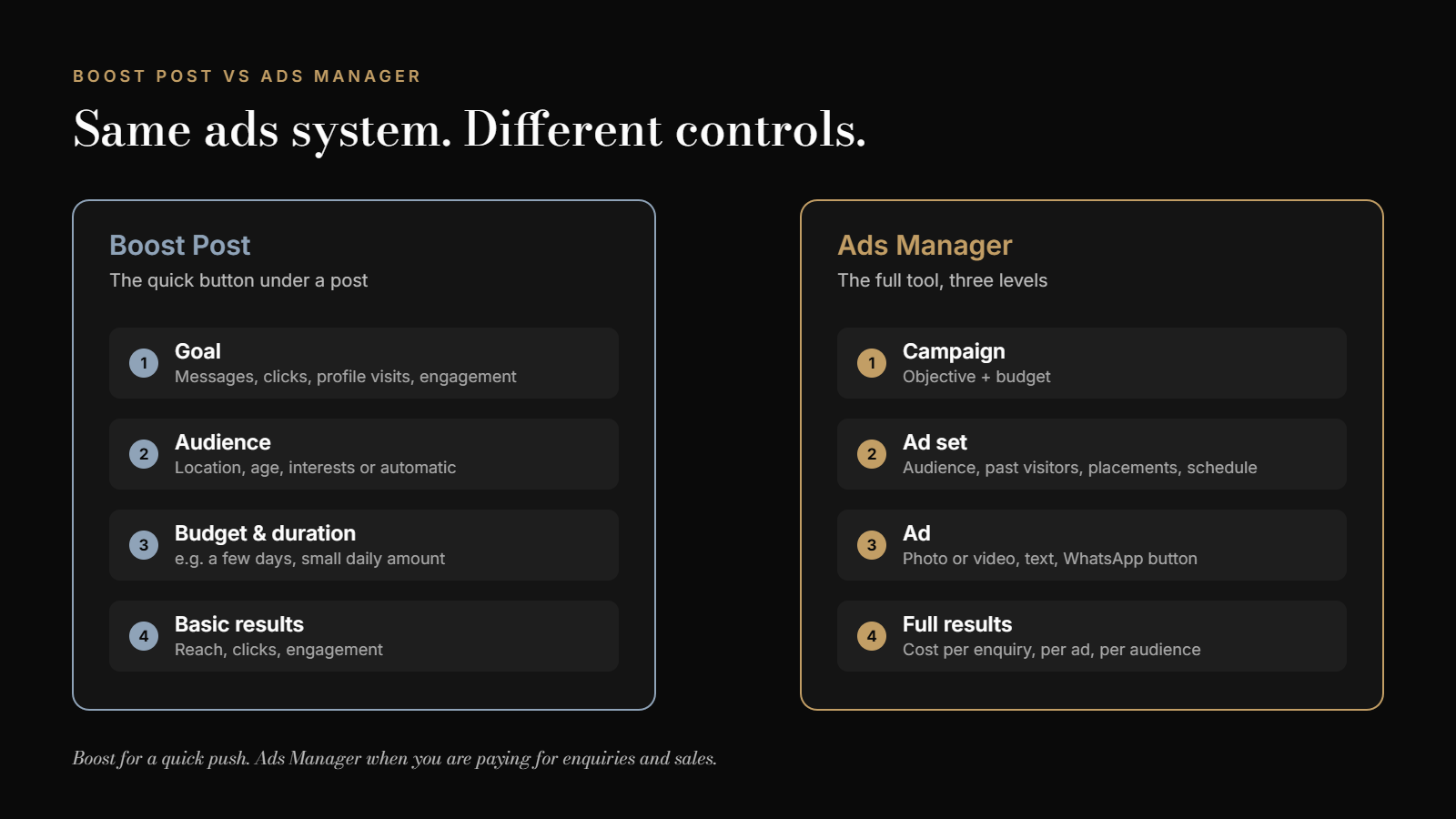
| Boost Post | Ads Manager | |
|---|---|---|
| Where you find it | The blue button under a post on your Page | business.facebook.com or the Ads Manager app |
| What you choose | A goal, an audience, a budget and the number of days | An objective, audiences, placements, schedule, budget, several ads and the destination |
| Goals available | Mainly engagement, link clicks, profile visits and messages | Six objectives: Awareness, Traffic, Engagement, Leads, App promotion and Sales |
| Audience | Location, age, gender and interests, or an automatic audience | All of that, plus people who visited your page, website or messaged you before |
| Testing | One post at a time | Several ads side by side, so you see which one works |
| Reports | Reach, clicks and engagement | Results per ad and per audience, cost per result, and breakdowns |
| Best for | A quick push for a post people already like | Campaigns meant to bring enquiries and sales |
Sources: Meta’s guide to choosing an ad objective, and comparisons by Hootsuite and the Digital Culture Network.
In a marketing strategy, ads serve the visibility stage: getting the right people to notice you. The visibility section of the small-business marketing strategy guide shows how it connects to trust, conversion and growth.
When boosting is perfectly fine
Boosting gets a bad name, but it is not useless. It is a good choice when:
- the post is already getting likes, comments and shares on its own,
- you want more people to see something time-limited, such as an event this weekend or a new arrival,
- the budget is small, for example a few hundred rupees over three to five days,
- you do not need to know exactly how many sales it brought.
Here is what you will see when you click Boost post. The options change from time to time and depend on your Page, but the shape is always the same: a goal, an audience, and a budget with a duration.
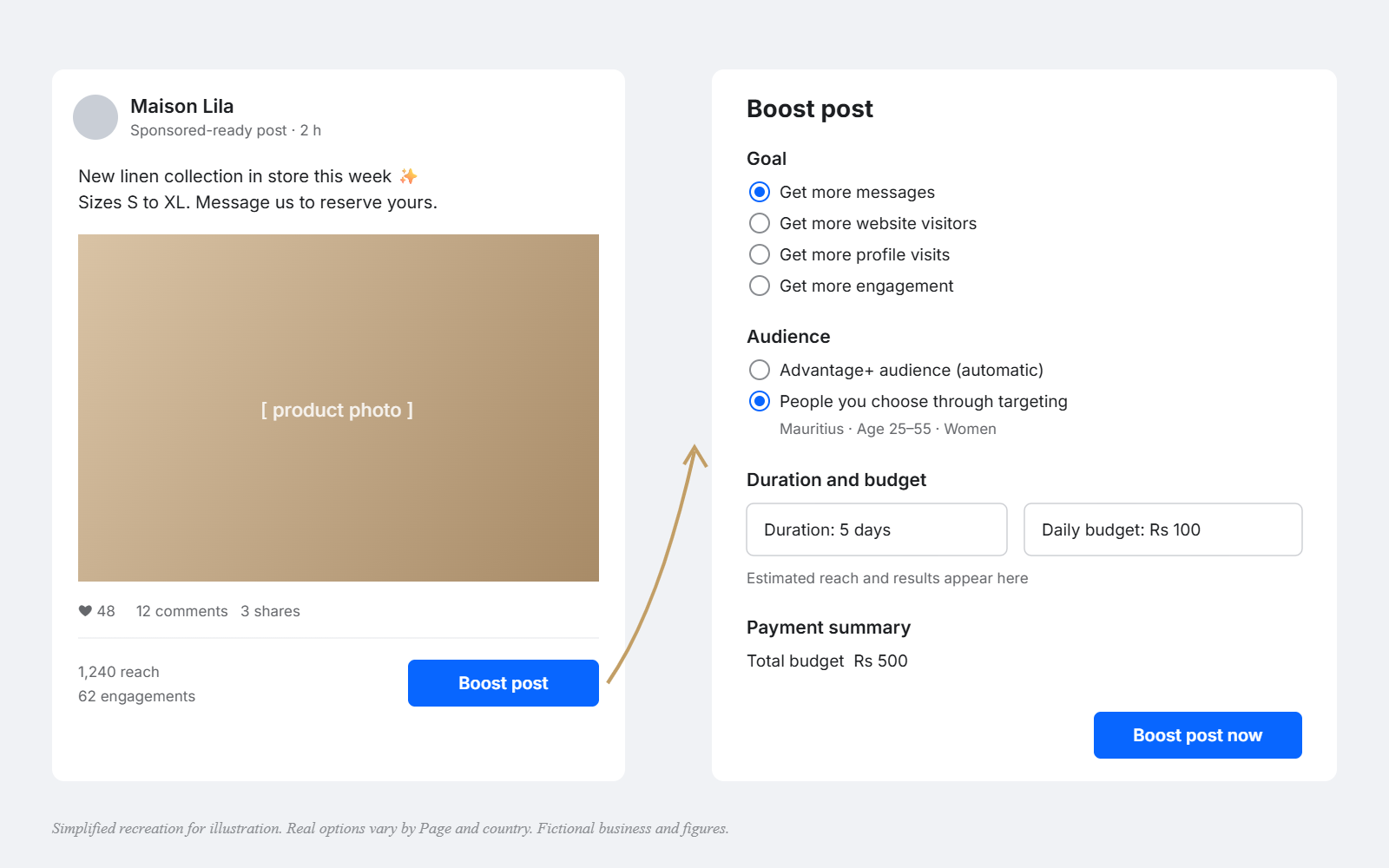
If the goal is “more messages”, make sure someone can reply quickly. The Google My Business guide for shops and the same WhatsApp number on every channel help people who do not message straight away find you later.
Check yours: Look at your last three boosts. Can you say what each one was supposed to achieve, and whether it did?
When to switch to Ads Manager
- You want a business result, such as WhatsApp enquiries, form leads or online sales, not just reach.
- You want to reach people who already know you: those who visited your page, watched your videos or messaged you. They usually cost less to convert.
- You want to test. Two or three versions of an ad, in English, French or Creole, to see which one brings results.
- You spend every month. Once ads are a regular cost, the extra control pays for the extra 30 minutes of setup.
The six Ads Manager objectives in plain words
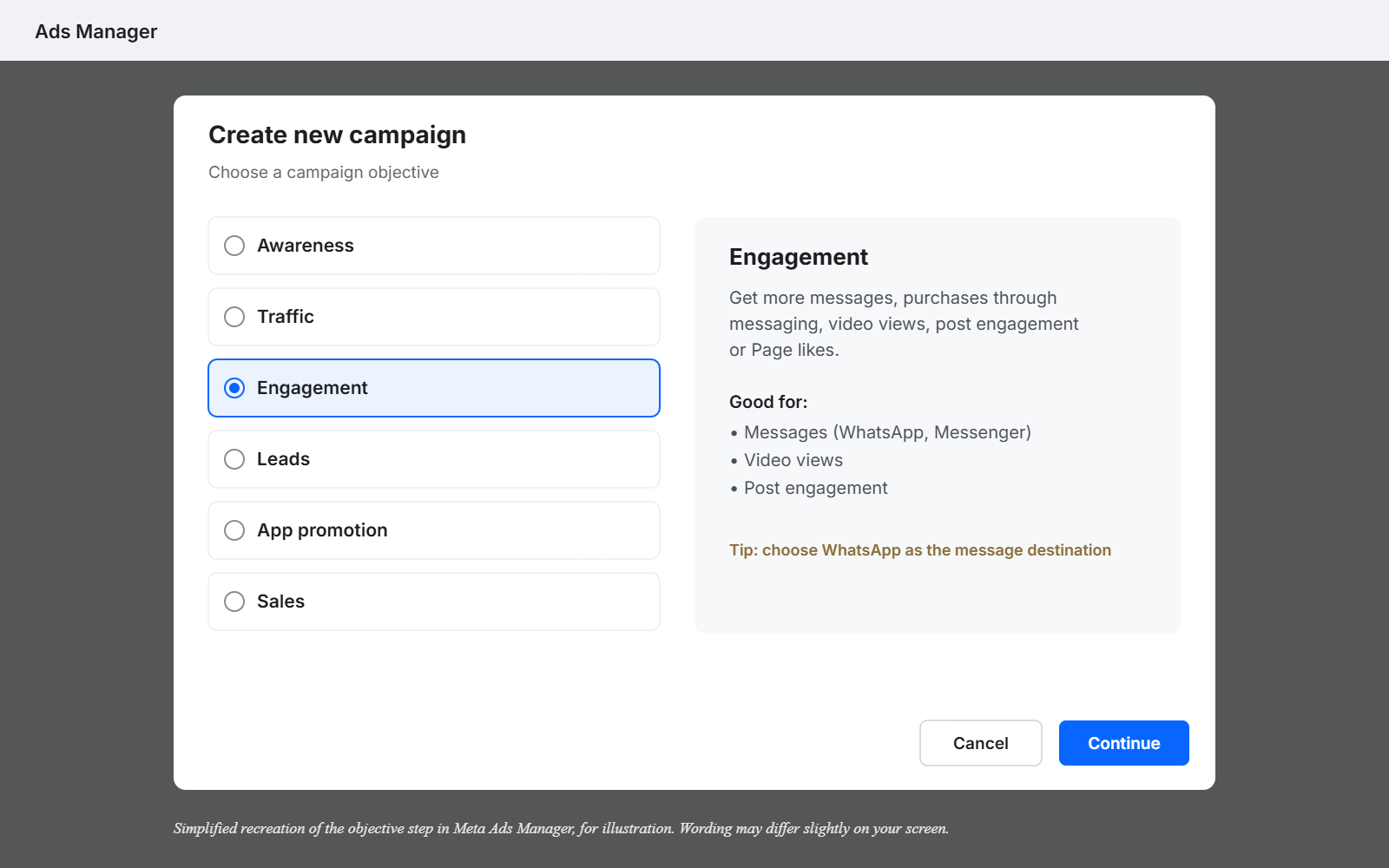
The objective is the most important choice in Ads Manager. It tells Meta what kind of person to look for. Choose “Engagement” and you get people who like and comment. Choose “Leads” and Meta looks for people likely to fill in a form or start a conversation.
| Objective | What Meta looks for | Use it for |
|---|---|---|
| Awareness | As many people as possible, as often as you choose | A new shop opening, a brand launch |
| Traffic | People likely to click through to a website or app | Sending people to a product page or menu |
| Engagement | People likely to like, comment, watch or message | Messages on WhatsApp or Messenger, video views |
| Leads | People likely to share their details or start a conversation | Quotes, bookings, consultations |
| App promotion | People likely to install or use an app | Only if you have an app |
| Sales | People likely to buy, using data from your website or catalogue | Online shops with tracking set up |
For most Mauritian small businesses, the useful objectives are Engagement (with messages as the goal) or Leads. Sales only works well once your website tracking is set up.
Your first Ads Manager campaign, step by step
This is a simple campaign to get WhatsApp enquiries. It takes about 30 minutes the first time.
- Open Ads Manager from business.facebook.com and click Create.
- Choose the objective. For WhatsApp enquiries, choose Engagement, then pick messaging apps and WhatsApp as the place you want people to go.
- Name the campaign clearly, for example “WhatsApp enquiries – October – linen dresses”.
- Set the budget. Start with a daily amount you are happy to test for seven days.
- Set the audience: Mauritius, or the towns you serve, plus age if it matters. Leave interests broad at first.
- Choose placements. “Advantage+ placements” lets Meta show the ad where it performs best across Facebook and Instagram.
- Create the ad: one clear photo or short video, a headline, two or three lines of text, and the button “Send WhatsApp message”.
- Before publishing, message your own number from another phone, so you know exactly what customers will see.
In the WhatsApp-enquiry campaigns I have run, an enquiry has cost about Rs 15 in ad spend. That is my experience, not a benchmark: cost changes with your industry, offer and season, and rises in busy months such as December. To turn that into a monthly budget, read how much a business in Mauritius should spend on marketing.
Check yours: Can you say, before you publish, who the ad is for and what happens in the first five minutes after someone messages?
Which language should your ads use?
Mauritius reads in three languages, and the right one depends on who you want to reach. Research backs the instinct to speak to people in their own language: in a 2020 survey of 8,709 consumers in 29 countries, CSA Research found that 76% prefer to buy products with information in their own language.
| Language | Often works for | Tip |
|---|---|---|
| Creole | Everyday products and services, local offers, video ads | Keep it natural and spoken, not translated word for word |
| French | Premium products, beauty, home and decor, professional services | Pair with a polished photo |
| English | Tourists, expats, B2B and corporate audiences | Simple sentences work best |
This table is guidance from experience, not a rule. The best way to know is to test. Ads Manager makes that easy: create two versions of the same ad in different languages and keep the one that brings more enquiries.
How many people can you reach? DataReportal’s Digital 2026 report for Mauritius put Facebook’s ad reach at 886,000 people and Instagram’s at 418,000. For most local businesses, Facebook still does the heavy lifting, with Instagram as a strong second for younger and premium audiences.
Common mistakes with Meta ads
- Choosing Engagement when you want sales. You will get likes, not buyers.
- Changing the ad every day. Give it at least five to seven days before judging.
- Targeting too narrowly. In a market of about 1.2 million people, tiny audiences get expensive fast.
- Sending people to a chat nobody answers. The most expensive mistake of all.
- No offer. “We sell sofas” is not an offer. “Free delivery island-wide this month” is.
Why Ads Manager alone will not grow your sales
Here is the trap. A business learns Ads Manager, picks the right objective, builds a neat audience, and still does not sell more. The ads were never the whole problem.
Ads Manager is a tool, and the tool is not the strategy. If nobody has decided who your priority customer is, what you are offering them, and what happens after they click, Ads Manager simply spends money more precisely on the wrong thing. More ads will not fix a leaking bucket.
Find your weakest stage first. If people see your ads but do not message, the problem may be the offer or trust. If they message but do not buy, it is conversion. The five stages of a small-business marketing strategy show where ads fit, and what to fix around them.
Check yours: For your current ads: who exactly is the customer, what is the offer, and who replies within five minutes?
Frequently asked questions
Is boosting a post a waste of money?
Not always. Boosting is fine for a small, short push on a post that is already popular. It becomes wasteful when you use it to chase sales or enquiries, which Ads Manager handles much better.
Is Ads Manager free to use?
Yes. Ads Manager is free. You only pay for the ads you run, from the budget you set.
How much should I spend on my first Facebook ads?
Start with a daily amount you are comfortable testing for seven days, then judge by the cost per enquiry, not by likes. Your full budget depends on your profit per customer.
Can I run Instagram ads from Ads Manager?
Yes. Ads Manager runs ads on Facebook, Instagram, Messenger and Meta’s partner apps from one place.
Which objective should I choose for WhatsApp messages?
For most small businesses, choose Engagement and select messaging apps with WhatsApp as the destination, or Leads if you want Meta to look for people likely to start a conversation.
Should I use Advantage+ automatic settings?
For a first campaign, automatic placements and a broad audience usually work well. Keep control of the most important choices yourself: the objective, the offer and the budget.
Before you spend more on ads
Boost when a post is already working and the stakes are small. Use Ads Manager when you are spending to get enquiries and sales. And before either, decide who the ad is for, what the offer is, and who answers the messages.
If you want those decisions made with you, the Market Dominator Blueprint finds what is really holding your sales back in 10 days, then puts one joined-up plan into action. Not ready for that? The free Market Dominator Scorecard shows your weakest stage in a few minutes.
Do you boost posts today, or have you already moved to Ads Manager? What made you switch?
Sources
- Meta Business Help Centre: How to choose the right ad objective in Meta Ads Manager
- CSA Research (2020): Can’t Read, Won’t Buy, B2C survey of 8,709 consumers in 29 countries
- DataReportal (2026). Digital 2026: Mauritius
- Hootsuite: Boosted posts vs. ads
- Digital Culture Network: What is the difference between boosted posts and ad campaigns?