Meta Business Suite: Full Guide for Businesses in Mauritius
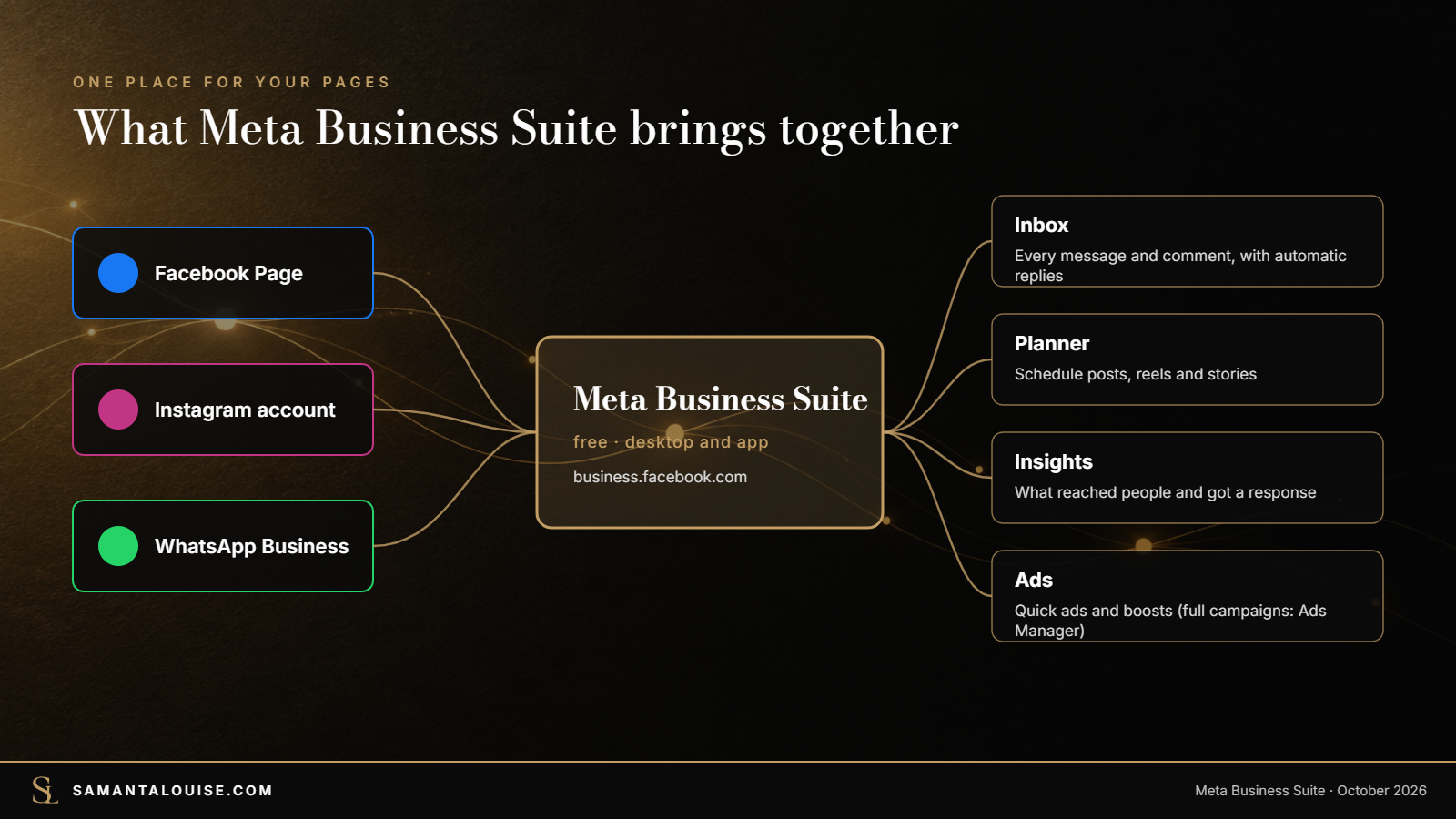
Meta Business Suite is Meta’s free tool for managing your Facebook Page, Instagram account and WhatsApp Business account in one place. You can plan and schedule posts, reels and stories, answer every message and comment from one inbox (with automatic replies), see what your content achieves, and create simple ads. For detailed ad campaigns you still use Ads Manager. For a small business in Mauritius, setting it up properly takes about 20 minutes and saves time every week.
THE QUICK ANSWER
- What it is: a free dashboard for Facebook, Instagram and WhatsApp Business.
- Inbox: all messages and comments in one place, with instant replies, away messages and FAQs.
- Planner: schedule posts, reels and stories for both Facebook and Instagram.
- Insights: see which content reaches people and gets a response.
- Ads: quick ads and boosts here; full campaigns in Ads Manager.
One warning before you start. Meta Business Suite makes it easy to post more. It does not tell you what to post, or for whom. Many businesses schedule 30 posts a month and are busy, not growing. This guide covers the tool, then how to make it serve a plan.
From my experience, if you also have other channels you manage, having a Meta Business Suite dashboard will not be sufficient. Tiktok, Google Business Profile and Youtube are not connected to it and therefore, you will end up having to do those manually. HighLevel CRM is the best tool according to me to manage all of it including your lead management system.
In this guide
What is Meta Business Suite?
According to Meta’s own description, Meta Business Suite is a free platform that helps small businesses and creators manage their presence across Facebook, Instagram, Threads and WhatsApp. It works on desktop (business.facebook.com) and as a mobile app. From one place you can:
- see an overview of your business, with a to-do list and your recent and scheduled posts,
- plan and schedule posts, stories and reels in a calendar, and run A/B tests on content,
- read and answer messages and comments from your Facebook Page, Messenger, Instagram and WhatsApp Business account in one inbox,
- view insights about your content and your audience,
- create simple ads or boost posts, and reach other tools such as Ads Manager.
In Mauritius, that covers the channels most customers use: DataReportal’s Digital 2026 report for Mauritius put Facebook’s ad reach at 886,000 people and Instagram’s at 418,000. In a marketing strategy, these channels mostly serve the visibility stage, but the inbox is where enquiries turn into sales.
Meta Business Suite vs Ads Manager
| Meta Business Suite | Ads Manager | |
|---|---|---|
| Main job | Day-to-day running of your pages: posts, messages, insights | Running and measuring paid campaigns |
| Ads | Quick ads and boosts | Full campaigns: objectives, audiences, placements, testing, rules |
| Messages | One inbox for Facebook, Instagram and WhatsApp, with automations | No inbox |
| Who uses it | The owner or whoever manages the pages | Whoever runs your ads |
Meta itself says to use Ads Manager for more detailed campaigns with advanced targeting. If you are unsure which ad route to take, read Ads Manager vs Boost Post.
How to set up Meta Business Suite in 20 minutes
- Go to business.facebook.com on a computer and log in with the Facebook profile that manages your Page.
- Create or choose your business portfolio, the account that owns your Page, Instagram account and ad account.
- Connect your Facebook Page and your Instagram professional account.
- Connect your WhatsApp Business number, if you use one, so its messages appear in the inbox. WhatsApp Business for small businesses explains the app itself.
- Add your team under people and permissions, giving each person only the access they need.
- Install the Meta Business Suite app on the phone of whoever answers customers.
Menu names change from time to time, but these steps stay the same.
The inbox: answer everyone from one place
The inbox is the part that makes money. Messages from Messenger, Instagram and WhatsApp, and comments on your posts, all land in one list. People expect a fast answer: according to the 2025 Sprout Social Index, about three-quarters of consumers expect a reply on social media within 24 hours, and 71% say they will buy from a competitor if a brand does not answer their customer service questions there.
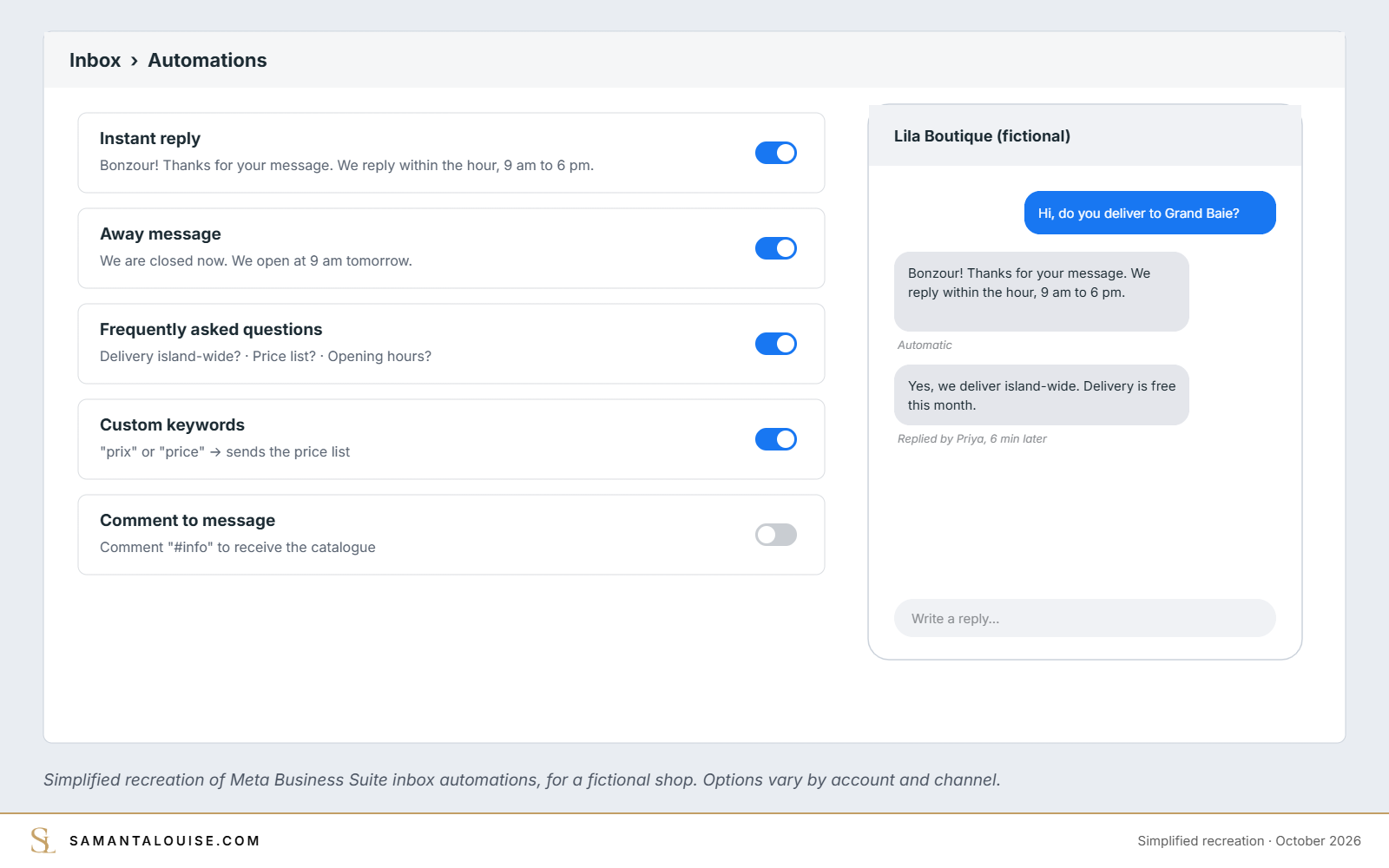
To answer faster, Meta Business Suite offers inbox automations. The main ones:
| Automation | What it does | Example for a Mauritian shop |
|---|---|---|
| Instant reply | Greets people who message you for the first time | “Hello! Thanks for your message. We reply within the hour, 9 am to 6 pm.” |
| Away message | Replies when you are not available | “We are closed now. We open at 9 am tomorrow.” |
| Frequently asked questions | Suggests questions and answers them | Delivery island-wide? Prices? Opening hours? |
| Location, contact, hours | Answers those common questions automatically | Sends your address in Rose-Hill and your opening hours |
| Custom keywords | Replies when a message contains a word you choose (desktop only) | “prix” or “pp” sends your price list |
| Comment to message | Replies by message to comments that contain a chosen hashtag | Comment “#info” to receive the catalogue |
Note from Meta: if you turn on Meta Business Agent, your existing automations such as away messages and instant replies are paused.
An automatic reply buys you time; it does not close the sale. Someone still needs to follow up, and to note each enquiry somewhere: a simple sheet or a CRM for small businesses.
Check yours: Message your own page from another phone. How long did the first real answer take?
Plan and schedule posts with the Planner
The Planner shows your posts, reels and stories for Facebook and Instagram in a calendar. You can write once, choose both channels and schedule for the time your customers are online. Use it to plan a week or a month in one sitting rather than posting in a rush.
The trick is to plan each post with a job. Tag each one with the stage it serves:
- Visibility: get noticed by new people (a reel, a tip, a local moment),
- Trust: show proof (reviews, behind the scenes, before and after),
- Conversion: ask for the enquiry (an offer, a deadline, “send us a message”).
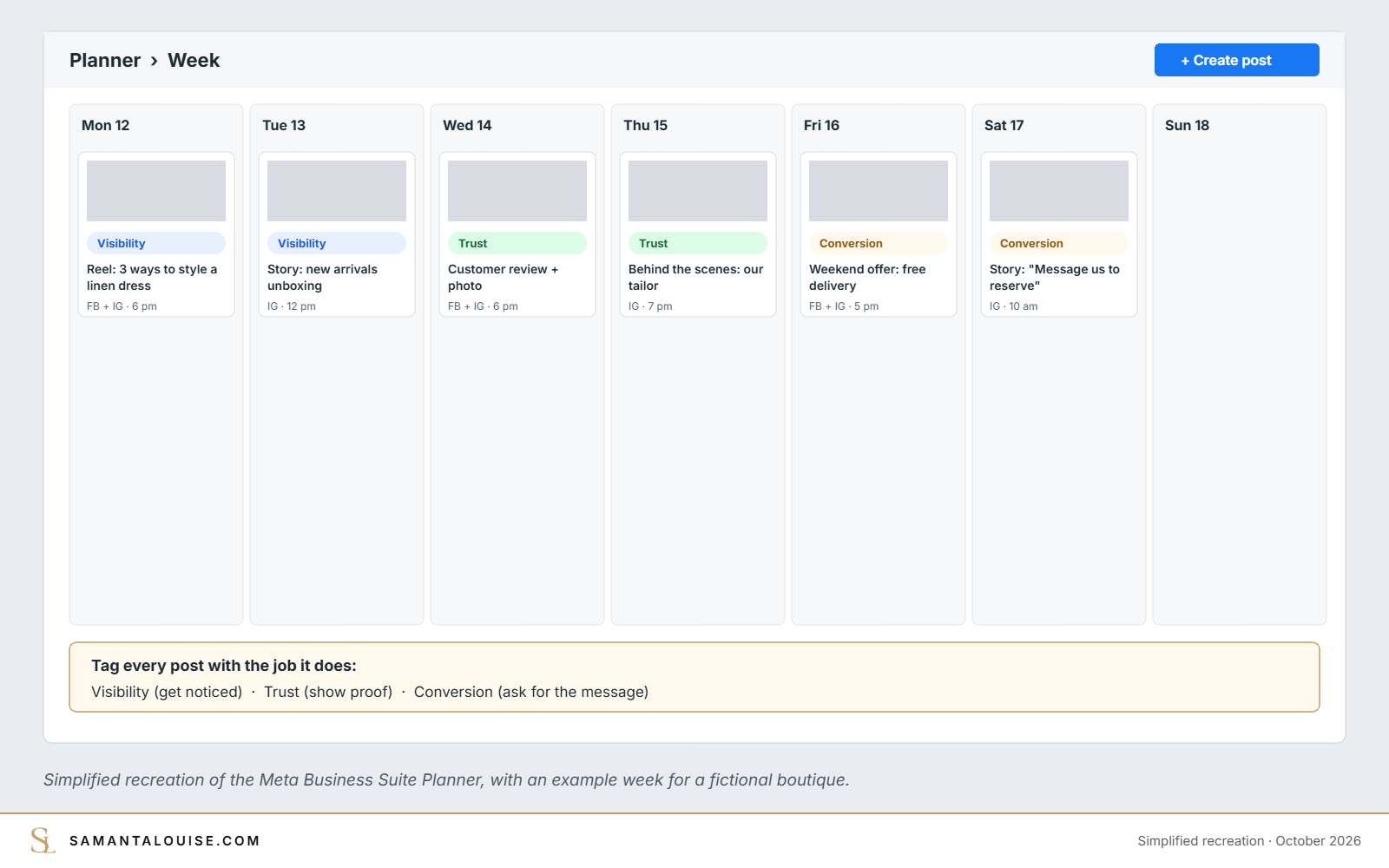
A simple rhythm for a small business: three posts a week, at least one of each type, plus stories on the days you have something to show.
Insights: what to look at once a month
Insights shows your reach, how each piece of content performed, and who your audience is. Once a month, look at three things:
- Which 3 posts reached the most people, and what they have in common,
- which posts led to messages, not just likes,
- when your audience is online, to schedule better.
Then do more of what led to messages, and less of what only got likes.
The 5 settings to check today
- Business details: correct opening hours, phone, WhatsApp number and address on both Facebook and Instagram.
- Connected accounts: Facebook Page, Instagram and WhatsApp Business all connected, so nothing is missed in the inbox.
- People and roles: at least two trusted admins, and no former staff or agencies still with full access.
- Inbox automations: instant reply, away message and three to five FAQs turned on.
- Notifications: the mobile app installed and notifications on for whoever answers customers.
Also turn on two-factor authentication on the Facebook accounts that manage your business. Losing access to a page is far more expensive than ten minutes of security.
Why Meta Business Suite alone will not grow your sales
Here is the trap. A business discovers the Planner, schedules a month of posts in one afternoon and feels organised. Three months later, the page is active, the likes are steady, and sales have not moved.
The tool did its job. What was missing was a reason for each post: who it is for, what it should make them do, and what happens when they message. Research points the same way: a 2023 study of 232 food and beverage SMEs in Cogent Business & Management found that richer use of social media, for sharing information and letting customers transact, improved business performance through stronger brand equity. Posting more is not the same as using social media well. The tool is not the strategy.
Find your weakest stage first. If people do not know you, plan for visibility. If they know you but do not message, plan for trust and offers. If they message but do not buy, fix the replies and follow-up. The five stages of a small-business marketing strategy show how to choose.
Check yours: Look at your last 10 posts. Could you say which stage each one served, and which one brought an enquiry?
Frequently asked questions
Is Meta Business Suite free?
Yes. Meta Business Suite is free to use. You only pay if you run ads or boost posts.
Is Meta Business Suite the same as Facebook Business Suite?
Yes. Facebook Business Suite was renamed Meta Business Suite. It is the same tool, now covering Facebook, Instagram, WhatsApp and Threads.
Can I schedule Instagram posts with Meta Business Suite?
Yes. You can schedule posts, reels and stories for both Facebook and Instagram from the Planner, and see them in a calendar.
Can I answer WhatsApp messages in Meta Business Suite?
Yes, if your WhatsApp Business account is connected. Its messages then appear in the same inbox as Messenger and Instagram.
What is the difference between Meta Business Suite and Ads Manager?
Meta Business Suite is for running your pages day to day: posts, messages, insights and simple ads. Ads Manager is for detailed ad campaigns with objectives, audiences, placements and testing.
Does Meta Business Suite have a mobile app?
Yes. There is a Meta Business Suite app, useful for answering messages and getting notifications on the go. Some features, such as custom keyword automations, are only on desktop.
Make your pages work for your sales
Set up Meta Business Suite, connect all three channels, turn on the five settings above, and plan every post with a job. Then check once a month which posts actually led to messages.
If you want a plan that tells you what to post, for whom and why, the Market Dominator Blueprint finds what is really holding your sales back in 10 days, then puts one joined-up plan into action. If you would rather have your Meta ads run for you, book a call. Not ready for either? The free Market Dominator Scorecard shows your weakest stage in a few minutes.
Do you use Meta Business Suite today, or do you still post and reply straight from your phone?
Sources
- Meta Business Help Centre: How Meta Business Suite works (checked 9 October 2026)
- Meta Business Help Centre: About automated responses in Meta Business Suite Inbox (checked 9 October 2026)
- Shandy, V. M., Mulyana, A. and Harsanto, B. (2023). Social media richness, brand equity, and business performance: an empirical analysis of food and beverage SMEs. Cogent Business & Management, 10(2)
- DataReportal (2026). Digital 2026: Mauritius
- Sprout Social: Social media customer service statistics (2025 Sprout Social Index)
- LBB Online (2025): Sprout Social 2025 Index highlights rising expectations for responsive customer care