CRM for Small Businesses in Mauritius: Where to Start and When to Upgrade
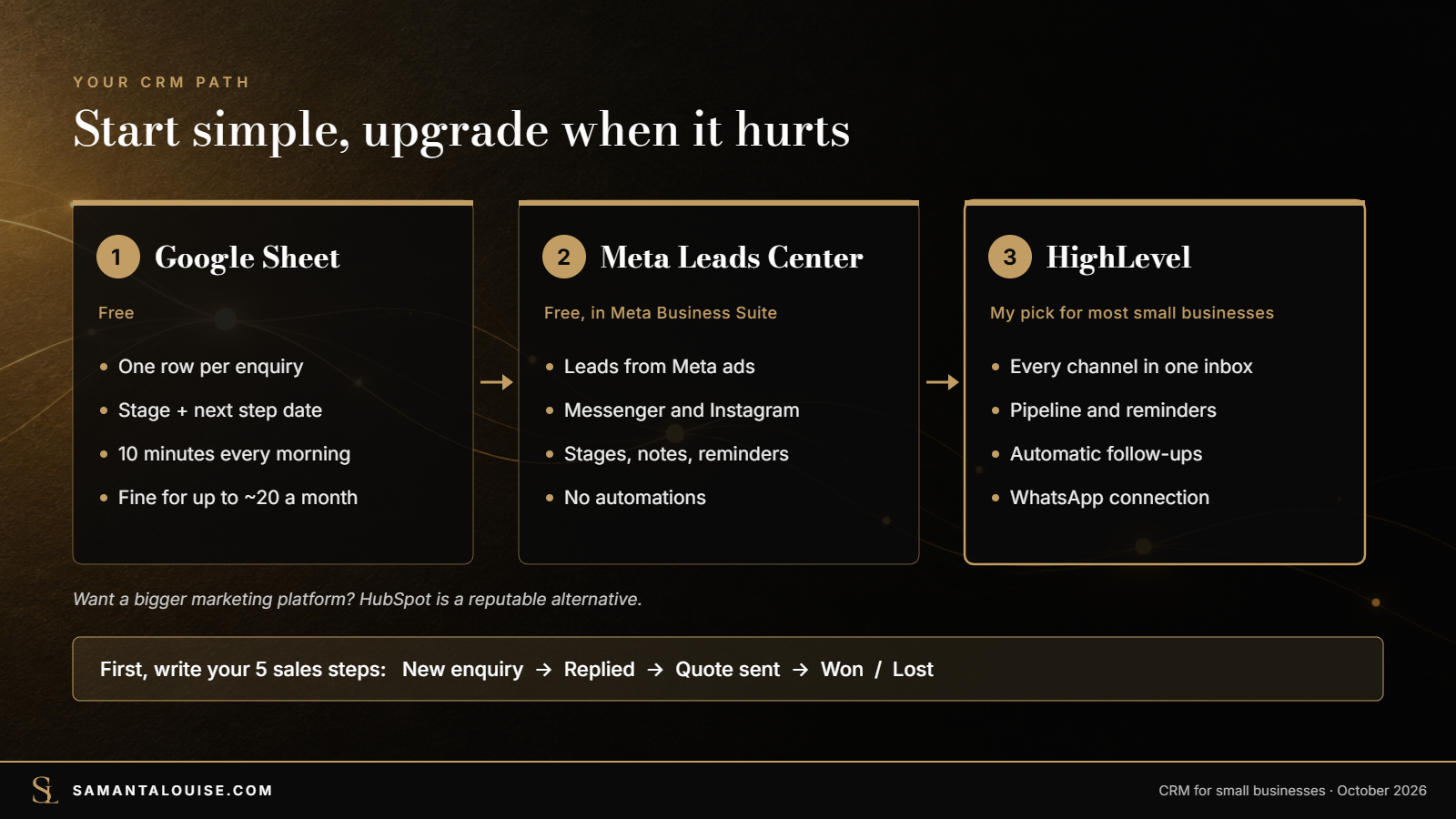
A CRM (customer relationship management) is one place where you keep every enquiry and customer: who they are, what they asked for, what happens next and when. For most small businesses in Mauritius, the best first CRM is a simple Google Sheet with ten columns, updated every day. Move to a CRM tool when the sheet can no longer keep up: several people answer enquiries, follow-ups get missed, or you want reminders and WhatsApp in one place. For most small businesses, the CRM I recommend is HighLevel. If your enquiries come only from Facebook and Instagram ads, Meta’s free Leads Center is a good first step.
THE QUICK ANSWER
- Start simple: a Google Sheet with one row per enquiry and a “next step” date is already a CRM.
- Write your sales steps first: enquiry, reply, quote, follow-up, won or lost.
- Upgrade when it hurts: more than one person replying, missed follow-ups, or too many rows to scan.
- Running Meta ads only? Meta Business Suite’s free Leads Center tracks those leads.
- My pick for small businesses: HighLevel, for the CRM, WhatsApp inbox and automatic follow-ups in one place. HubSpot suits teams that want a bigger, more “pro” platform.
Prices and plan limits checked on 6 October 2026.
One warning before any tool. A CRM tracks a sales process; it cannot invent one. Many businesses buy a CRM, import their contacts and stop updating it within a month, because nobody decided what the steps were or who owns the follow-up. This guide starts with that, then the tools.
In this guide
What is a CRM, in plain words?
Think of the notebook next to the till, or the WhatsApp chats you scroll through to remember who asked for a quote. A CRM does the same job, but in one organised place that anyone in the team can read. For each person it keeps:
- who they are: name, phone or WhatsApp number, where they found you,
- what they want: the product or service, and roughly what it is worth,
- where they are: the stage of your sales process, from new enquiry to won or lost,
- what happens next: the next action and the date it is due.
That last column is the one that makes money. Most lost sales in small businesses are not lost to a competitor; they are simply never followed up. In a marketing strategy, the CRM belongs to the conversion stage: turning enquiries into sales. The conversion section of the small-business marketing strategy guide explains where it fits.
Do you need a CRM tool yet?
| Your situation | What to use |
|---|---|
| Fewer than about 20 new enquiries a month, and you answer them yourself | A Google Sheet (template below) |
| Your enquiries come almost only from Facebook and Instagram ads | Meta Business Suite’s free Leads Center |
| Two or three people reply to customers, or follow-ups are slipping | A CRM tool: HighLevel, or HubSpot’s free CRM to start |
| Enquiries come from ads, WhatsApp, Facebook and your website every day, and you want automatic reminders and messages | HighLevel, with automations, usually set up for you |
| You sell to a few large clients over months | A CRM with a clear pipeline and notes, even if the volume is small |
The thresholds are my guidance, not a rule. The real test is whether any enquiry is being forgotten.
Start with a free CRM in Google Sheets
A spreadsheet is a perfectly good first CRM, as long as it has the right columns and someone opens it every day. Create a Google Sheet with these columns:
| Column | What to write | Example |
|---|---|---|
| Date | When the enquiry came in | 6 Oct |
| Name | First name is enough | Anjali |
| WhatsApp / phone | The number they contacted you from | 5xxx xxxx |
| Source | Where they found you | Facebook ad, Google, referral |
| Wants | Product or service | Sofa, 3-seater |
| Value (Rs) | Rough value of the sale | 35,000 |
| Stage | Pick from a fixed list | Quote sent |
| Next step | The very next action | Send fabric photos |
| Next step date | When it is due | 8 Oct |
| Owner | Who is responsible | Priya |
Use the same five stages every time, and add them as a drop-down list (Data > Data validation in Google Sheets) so nobody invents new ones:
- New enquiry: they contacted you, nobody has replied yet,
- Replied: you answered and asked the right questions,
- Quote sent: they have a price or a proposal,
- Won: they paid or booked,
- Lost: they said no or went silent after three follow-ups. Write down why.
You can ask Claude AI to create a proper spreadsheet for you with the right formula and dashboard if you want to track all of it manually. If you want to to send the leads automatically to the spreadsheet without any manual intervention, you can use Zapier or Pably to do the connection. But from what I observed in the past, this can become a nightmare quickly when you have many leads from multiple platforms. The best solution is to get a CRM like Highlevel.
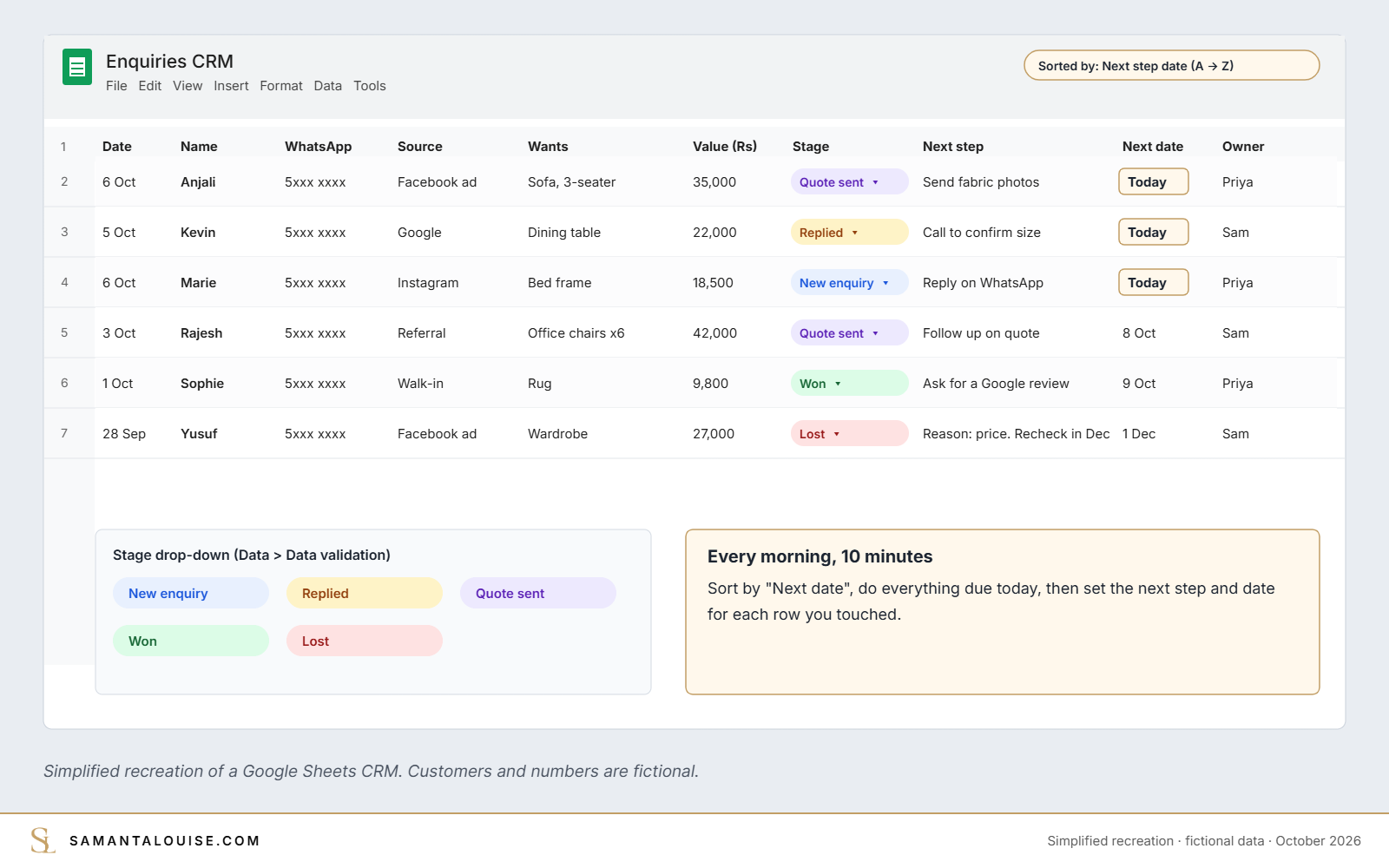
Then make it a habit. Every morning, sort by “Next step date” and do everything due today. Ten minutes a day is enough for most small businesses. When someone buys, add a next step to ask for a review: five habits to get more Google reviews shows how.
Keep the sheet private and share it only with the people who answer customers. It holds your customers’ personal details.
Check yours: Open your WhatsApp chats from last week. How many enquiries never got a second message?
Signs you have outgrown the spreadsheet
- Two people answer the same customer, or nobody does, because each thought the other had it.
- Follow-ups depend on someone remembering to open the sheet.
- You cannot see your numbers: how many enquiries came from ads this month, or how many quotes turned into sales.
- Customer history is spread out across phones, WhatsApp, email and the sheet.
- The sheet has hundreds of rows and nobody scrolls past the first screen.
If two or more of these are true, it is time for a CRM tool.
Free CRM vs paid CRM: which one to choose
Here are the three options I suggest to small businesses, as their websites showed them on 6 October 2026. Prices are in US dollars and change often.
| Meta Business Suite (Leads Center) | HighLevel | HubSpot | |
|---|---|---|---|
| Cost | Free | From $97 a month on the HighLevel website (see below) | Free CRM; paid Starter from $15 per seat a month |
| What it is | Not a full CRM, but a free board to track leads from your Meta ads, Messenger and Instagram | A CRM, pipeline, one inbox for your messages, and automatic follow-ups in one system | A well-known CRM with deals, email tracking and a large set of paid marketing tools |
| Best for | Businesses that advertise only on Facebook and Instagram | Most small businesses that get enquiries from several channels | Teams that want a bigger, more “pro” platform, especially for email and social media marketing |
| Watch out for | Only Meta leads; no automations; manual reminders | Built for agencies, so it is usually set up for you | The free plan is limited to 2 users and 1,000 contacts; many features are paid |
Sources: Meta Business Help Centre, HighLevel pricing and HubSpot CRM, checked 6 October 2026. Leads Center details from a 2026 guide by LeadSync.
Running Meta ads? Start with Meta Business Suite
If your enquiries come mainly from Facebook and Instagram ads, you already have a free tool. The Leads Center in Meta Business Suite shows leads from your lead ads, Messenger and Instagram on a board with stages, and lets you assign leads, add notes and set reminders. It is not a full CRM: it does not collect leads from Google or your website, and it has no automatic follow-ups. But it is far better than a scattered inbox.
Why I recommend HighLevel for most small businesses
HighLevel is the CRM I use and set up for my clients. It puts the pipeline, your conversations and automatic follow-ups in one place, for example a reply within minutes of an enquiry and a reminder three days after a quote. The HighLevel website lists plans from $97 a month, because it is built for agencies. Through my agency account, I can give small businesses access for much less, around $30 a month. Book a call and I will tell you whether it fits your business.
I do not simply give you access and leave you to figure out the rest, for an extra Rs 5000, I set it up for your business success based on your needs so feel free to contact me if you are interested in the service.
Want HubSpot instead?
HubSpot is a reputable choice if you want a bigger platform, especially social media marketing. Its free CRM allows up to 2 users and 1,000 contacts, which is a good way to try it.
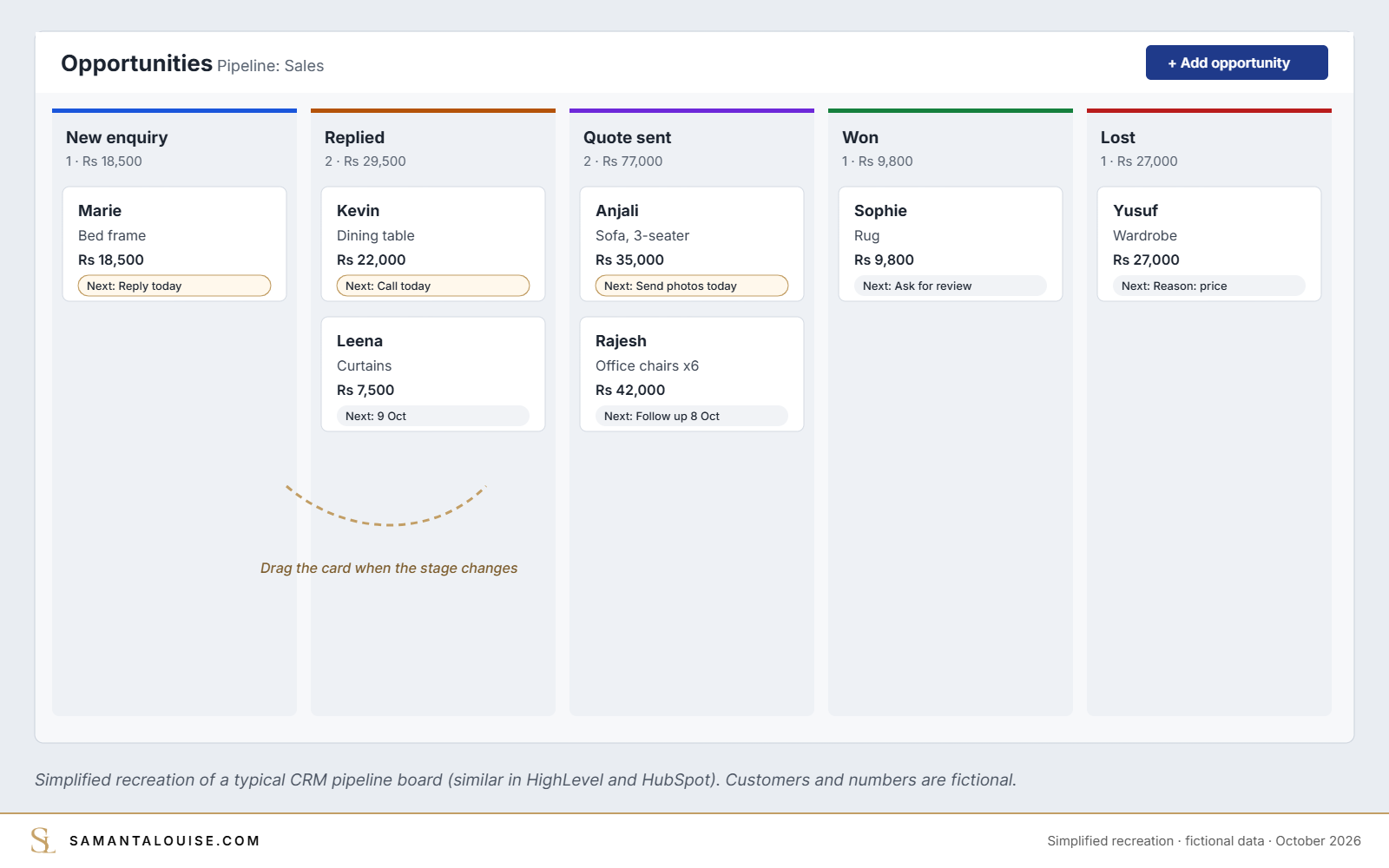
Whatever you choose, the screen you will use most looks like this: a board with one column per stage, and a card for each enquiry that you move to the right as the sale progresses.
Need something made for your business?
Some businesses need more than an off-the-shelf CRM: a booking flow, a customer portal or an app built around how they actually sell. I also build custom apps for businesses. If that sounds like you, book a call and tell me what you need.
A CRM is also a monthly cost. Plan it with the rest of your spending: how much a business in Mauritius should spend on marketing includes tools in the budget.
How to move from the sheet to a CRM in one afternoon
- Clean the sheet. Delete duplicates, and mark old enquiries as Won or Lost.
- Set up the same five stages as your pipeline in the new CRM.
- Import the sheet as a CSV file. Most CRMs, including HighLevel and HubSpot, have an import tool that matches your columns.
- Connect where enquiries arrive: your email, website form and, if the plan allows it, WhatsApp Business.
- Agree one rule with the team: every enquiry goes into the CRM the same day, with an owner and a next step date.
- Review the board once a week for the first month: what is stuck, and why.
Check yours: Could each person in your team say, today, which customers they must follow up with tomorrow?
What research says about CRMs in small businesses
- In their Harvard Business Review article “Avoid the Four Perils of CRM”, Rigby, Reichheld and Schefter (2002) named the first peril as implementing CRM before creating a customer strategy. The others: rolling out CRM before changing the organisation to match, assuming more CRM technology is better, and “stalking, not wooing” customers.
- A 2026 study in Piccola Impresa / Small Business by Cinti, Sabatini, Lillini and Temperini followed CRM adoption in a small firm and found that the business ended up adopting CRM-like practices without dedicated software, and that adoption should be judged from more than a technology point of view.
Both point the same way: the habits and the process matter more than the software.
Why a CRM alone will not grow your sales
Here is the usual story. A business signs up for a CRM, imports 2,000 contacts and spends a weekend setting up fields. Three weeks later, the team is back to WhatsApp and memory, and the CRM is full of out-of-date records.
The CRM was not the problem. Nobody had decided who the priority customers were, what the sales steps were, how fast an enquiry must be answered, or who follows up. A CRM supports a sales process; without one, it is an expensive address book. The tool is not the strategy.
Find your weakest stage first. If you are not getting enough enquiries, a CRM will not fix that. If enquiries arrive but do not turn into sales, it can help, once the process is clear. The five stages of a small-business marketing strategy help you see which problem you actually have.
Check yours: Can you write your sales process in five steps, with who does each step and how fast?
Frequently asked questions
What is the best CRM for a small business?
For most small businesses that get enquiries from several channels, I recommend HighLevel, because the CRM, inbox and automatic follow-ups are in one place. If you only advertise on Meta, start with the free Leads Center. If you want a bigger marketing platform, HubSpot is a reputable option.
What does CRM stand for?
CRM stands for customer relationship management. In practice, it means one organised place to track every enquiry and customer, and what needs to happen next.
Is there a free CRM for small businesses?
Yes. A Google Sheet works as a first CRM. If you run Meta ads, the Leads Center in Meta Business Suite is free for those leads. HubSpot’s free CRM allows up to 2 users and 1,000 contacts (checked 6 October 2026).
Can a CRM work with WhatsApp?
Some can. HighLevel connects WhatsApp to its inbox, listed as an add-on on its pricing page. If most of your sales happen on WhatsApp, check this before you choose a CRM.
How much does a CRM cost in Mauritius?
CRM tools are priced in US dollars. Free options exist (a Google Sheet, Meta’s Leads Center, HubSpot’s free CRM). HubSpot’s paid plans start at $15 per seat a month. HighLevel lists plans from $97 a month, but small businesses can often get access through an agency account for much less.
When should a small business get a CRM?
When enquiries are being forgotten, when more than one person answers customers, or when you cannot tell which channel brings sales. Until then, a well-kept spreadsheet is enough.
Before you pay for a CRM
Start with a sheet, write down your five sales steps, and make the daily follow-up a habit. Move to a CRM tool when the sheet starts losing enquiries, not before.
If you want the sales process designed with you, and the right CRM set up around it (or a custom app, if you need one), the Market Dominator Blueprint finds what is really holding your sales back in 10 days, then puts one joined-up plan into action. Not ready for that? The free Market Dominator Scorecard shows your weakest stage in a few minutes.
How do you keep track of enquiries today: a notebook, WhatsApp, a sheet or a CRM?
Sources
- Rigby, D., Reichheld, F. and Schefter, P. (2002). Avoid the Four Perils of CRM. Harvard Business Review, February 2002
- Cinti, A., Sabatini, A., Lillini, N. and Temperini, V. (2026). CRM adoption in SMEs: what’s wrong? An empirical perspective on key actors. Piccola Impresa / Small Business
- HubSpot: Free CRM (checked 6 October 2026)
- Meta Business Help Centre: Manage conversations with leads (checked 6 October 2026)
- HighLevel: Pricing (checked 6 October 2026)
- LeadSync (2026): Using the Meta Leads Center as a CRM for Facebook leads