Google Business Profile for Service Businesses in Mauritius: What Customers Check Before They Call
A Google Business Profile brings calls to a service business in Mauritius when six things are right: the right setup, an exact category, recent reviews with replies, real photos of your work, a list of services with prices, and a one-tap way to reach you. Customers check these in less than a minute, usually before they ever see your website.
THE QUICK ANSWER
- The right setup: Choose the right category for your business. If a physical business, put an address. If a service business, list the areas you serve.
- An exact category: “Car detailing service”, not “Business”.
- Recent reviews, all answered: at least one from the last month, and a reply to each within a day.
- Real photos of your work: before and after, your team, your van or your space. No stock images.
- Services with “from” prices, so customers can guess the cost without calling.
- One-tap contact: a WhatsApp chat link and, if you take appointments, a booking link.
Most of this takes one afternoon, and it costs nothing.
The rest of this guide explains each point: why it matters to customers, how to set it up within Google’s rules, and exactly what to write. The example throughout is a mobile car valeting business in Quatre Bornes, but the same steps work for salons, clinics, home services, garages, tutors and professional services. If you sell products, a separate guide for shops is coming.
In this guide
Why your profile matters more than your website when you sell a service
Picture it from the customer’s side. It is Saturday morning, the car is still full of sand from last weekend at Flic en Flac, and guests are coming tomorrow. They search “car valeting near me” on their phone.
Google shows three businesses on a map. One has 4.8 stars and photos of spotless interiors. One has three reviews from 2023. One has no photos at all. They call the first one. The decision took less than a minute, and they never opened a website.
A Google Business Profile is the free listing that appears on Google Maps and in the local results when someone searches for a service near them. It shows your name, stars, photos, hours, services and contact buttons, often before anyone visits your website. Many small service businesses in Mauritius do not even have a website, and they still get calls from their profile.
Google says local results are based mainly on three things: relevance (how well your profile matches the search), distance (how far you are from the person searching) and prominence (how well known your business is, including how many reviews you have). It also says: “There’s no way to request or pay for a better local ranking” (Google Business Profile Help).
You cannot change your distance. You can change your relevance, by describing your services clearly, and your prominence, by earning reviews. That is what the rest of this guide covers.
For a service business, the profile is also about trust. Customers are letting you into their home, handing you their car, or trusting you with their health or their money. Before they call, they want proof that you are real, that you do good work, and that you answer. In my guide to marketing strategy for small businesses in Mauritius, this is the Trust stage. For most service businesses, the Google profile is where trust is won or lost.
Storefront, service area or both: choose the right setup
This is the part most service businesses get wrong, and it can get a profile suspended. Google allows three setups:
| Setup | What it means | Examples in Mauritius | Show your address? |
|---|---|---|---|
| Storefront | Customers come to you during opening hours | Hair salon, clinic, garage, gym | Yes |
| Service area | You go to the customer, and nobody visits your base | Mobile valeting, aircon repair, plumber, cleaner, pest control | No, remove it |
| Hybrid | Customers can come to you, and you also go to them | A valeting centre that also does home visits, a physiotherapist who does home visits | Yes, and add service areas |
Google’s rules for service areas are clear (Google Business Profile Help):
- If you don’t serve customers at your address, remove it from your profile. A home address on show for a business nobody visits is the classic mistake.
- You can list up to 20 service areas, such as towns or districts.
- Your overall area should stay within about 2 hours of driving from your base. On an island our size, that can cover most of Mauritius, but only list the places you really serve.
- You cannot set a radius around your base.
Example: a mobile valeter based in Quatre Bornes who works across Plaines Wilhems and Moka would remove the home address and list Quatre Bornes, Rose-Hill, Vacoas, Phoenix, Curepipe, Moka and Ebène as service areas.

What customers check, in the order they check it
Open your own profile on your phone. Search for your service the way a customer would, and look at your listing next to your competitors’. Here is what people look at, roughly in this order.
1. Your name and main category
Your name should be your real business name, exactly as it appears on your sign, van or documents. Adding keywords to the name, such as “Best Car Wash Quatre Bornes”, goes against Google’s guidelines and can get your profile suspended.
Your main category tells Google what you are. Pick the most exact one: “Car detailing service” is more precise than “Car wash”, and “Air conditioning repair service” is more precise than “Contractor”. Add secondary categories only for services you really offer.
Check yours: does your main category describe the service people search for most?
2. Your stars, number of reviews and how recent they are
This is where most customers decide. In BrightLocal’s 2026 survey, 68% of consumers said they need at least a 4-star rating before using a business, and 31% only use businesses rated 4.5 or higher. Recency matters too: 74% want to see reviews from the last three months (BrightLocal, 2026).
A 4.9 rating from 2022 looks like a business that may have closed. Ten recent reviews do more for you than fifty old ones.
Check yours: do you have at least one review from the last month?
3. Photos of your team and your finished work
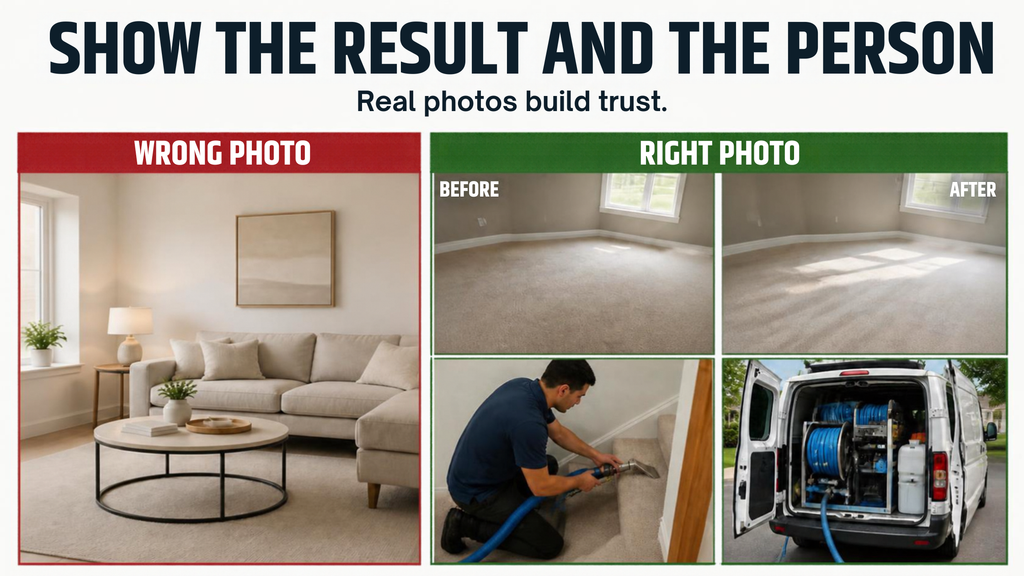
A customer buying a service is buying a result and a person, so show both. For a valeting business, that means before and after shots of interiors, the team at work, and your van and equipment. For a salon, finished hairstyles and the space. For a clinic, the treatment room and the team.
Use real photos taken on your phone, in good daylight. Stock images make a service business look like it has something to hide.
Check yours: can a stranger see real examples of your work within two swipes?
4. Your services and prices
Customers want two answers fast: do you do what I need, and roughly how much will it cost? The Services section answers both. List each service separately, with a one-line description and a “from” price if you can.
Since Google removed the questions and answers section in 2025 (more on that below), your services list is also where you answer the questions people used to ask there.
Check yours: could a customer guess your price range without calling?
5. How to reach you: call, WhatsApp, book
In Mauritius, many customers would rather send a WhatsApp message than call. Google lets you add a WhatsApp chat link in the Contact section of your profile (Google Business Profile Help). If you take appointments, add a booking link too: Google lets you add “Book an appointment” links (Google Business Profile Help).
Check yours: can a customer reach you the way they prefer, in one tap?
6. Your hours
Set your real hours, including days that are “by appointment only”, and update your special hours before public holidays. A customer who sees you as “open” and then gets no answer rarely tries twice.
Check yours: are your public holiday hours set for the coming month?
How to claim or create your profile
- Search for your business first on Google Maps. Google sometimes creates a listing automatically, and customers can suggest one. If yours exists, claim it rather than creating a duplicate.
- Go to business.google.com and sign in with a Google account that belongs to the business, not a staff member’s personal account.
- Enter your business name exactly as it appears in real life.
- Choose your main category, as explained above.
- Choose your setup: add an address if customers come to you, or add service areas if you go to them.
- Place the map pin carefully if you show an address. Many Mauritian addresses have no street number, so drag the pin to your exact entrance.
- Add your phone number and website. If you do not have a website yet, you can still create the profile.
- Verify your business. Google chooses the method. It often asks for a short video showing your location, vehicle, tools or proof of business, so have them ready.
What to write in each section
| Section | What to put | Example (mobile valeting) | Common mistake |
|---|---|---|---|
| Description | What you do, for whom, where, and what makes you different, in plain words (up to 750 characters) | “Mobile car valeting across Plaines Wilhems and Moka. We come to your home or office with our own water and power. Interior deep cleans, exterior wash and wax, and pre-sale valets. Nettoyage intérieur et extérieur à domicile.” | A list of keywords instead of sentences |
| Services | One entry per service, with a one-line description and a “from” price | “Interior deep clean: seats, carpets, dashboard and windows. From Rs 1,800.” | One vague service called “Car cleaning” |
| Service areas | The towns you really cover | Quatre Bornes, Rose-Hill, Vacoas, Phoenix, Curepipe, Moka, Ebène | Listing the whole island to look bigger |
| Photos | Team, work in progress, before and after, vehicle | 3 before-and-after pairs, 2 team photos, 1 photo of the van | Only a logo, or stock images |
| Contact | Phone, WhatsApp chat link, booking link | A WhatsApp link that opens a chat with the business | A number nobody answers |
| Hours | Real availability, plus special hours for holidays | Monday to Saturday, 8:00 to 17:00. Closed Sundays | “Open 24 hours” when you are not |
A note on language: customers in Mauritius search in English and in French. Writing your description mainly in the language most of your customers use, with one natural sentence in the other, helps both groups find you and understand you. Keep it natural: stuffing keywords into your profile goes against Google’s guidelines.
Reviews: how to get more, inside Google’s rules
Reviews are the fastest way to improve both your ranking and your trust. But Google is strict about how you ask, and it tightened its rules again in April 2026.
What Google does not allow
- Offering anything in exchange for a review: a discount, a free service, a gift or entry into a draw.
- Asking only your happy customers, and steering unhappy ones elsewhere.
- Since 17 April 2026: setting staff targets for the number of reviews they collect, or asking customers to include specific content, such as a staff member’s name (PPC Land, April 2026).
- Writing reviews yourself, or asking friends and family who never used your service.
Breaking these rules can get reviews removed and a warning shown on your profile. The safe approach is simple: ask every customer, give nothing in return, and never tell them what to write.
I have a friend who started a business and asked his family and friends to give him reviews. This did not last long as many of the reviews were removed so be careful with this.
When and how to ask
The best moment is right after the job, when the customer has just seen the result. For a valeter, that is when the customer opens the car door and smiles. Ask in person, then send the link by WhatsApp the same day. You can find your review link in your Business Profile under “Ask for reviews”.
Ready-to-copy message in English:
“Thank you for trusting us with your car today, [Name]. If you have a minute, a short Google review would help our small business a lot. Here is the link: [link]”
And in French:
“Merci de nous avoir fait confiance aujourd’hui, [Prénom]. Si vous avez une minute, un petit avis sur Google aiderait beaucoup notre petite entreprise. Voici le lien : [lien]”
How to reply to reviews
Reply to every review, good or bad. In BrightLocal’s 2026 survey, 89% of consumers said they expect business owners to respond to reviews, 32% expect a reply within a day, and half view generic, copy-paste replies negatively (BrightLocal, 2026).
To a good review:
“Thank you, Priya. So glad the seats came out looking new before your trip. See you next time!”
To a bad review:
“Hello Kevin, thank you for telling us. You are right that we arrived 40 minutes late, and we should have called ahead. We have changed how we plan morning bookings. We would like to make it right, so please message us on WhatsApp.”
Keep replies short, personal and calm. A specific, honest reply to a bad review can reassure future customers more than another five stars.
What changed recently, and why many guides are out of date
Google Business Profile changes often, and a lot of advice online, including some guides written for Mauritius, still describes features that no longer exist.
- Chat inside Google ended on 31 July 2024. Customers can no longer message you through Google’s own chat (Google Business Profile Help). Add your WhatsApp chat link or a text message option in the Contact section instead.
- Questions and answers ended in November 2025. Google discontinued the Q&A feature for businesses on 3 November 2025 (Google for Developers). The answers customers look for now have to come from your description, your services, your reviews and your website.
- AI increasingly answers questions about you. Google now uses AI to summarise businesses and answer questions based on what you have published. The clearer your services, prices and description, the more accurate those answers will be.
Example: a valeting business, before and after
Brillan Mobile Valeting is a fictional business based in Quatre Bornes that cleans cars at customers’ homes and offices. The details are made up, but every problem in the “before” column is common.
| Part of the profile | Before | After |
|---|---|---|
| Setup | Home address on show, map pin on the owner’s house | Address removed, 7 service areas listed |
| Name | “Brillan Valeting Best Car Wash Mauritius” | “Brillan Mobile Valeting” |
| Category | “Car wash” | “Car detailing service”, plus “Car wash” |
| Photos | The logo and 2 old photos | 12 photos: before-and-after interiors, the team, the van |
| Services | None listed | 4 services, each with a description and a “from” price |
| Contact | Phone only, often unanswered | WhatsApp chat link, booking link and a reply-time rule |
| Reviews | 6 reviews, the last one 14 months old, no replies | A review request after every job, and every review answered within a day |
None of these changes costs money. Together, they take one afternoon, plus a few minutes after each job.
Your 15-minute weekly routine
- Reply to every new review (5 minutes) or you can automate this like I did before with the use of Highlevel CRM.
- Add 2 or 3 new photos of the week’s work (5 minutes).
- Check your hours for the coming week and any public holidays (2 minutes).
- Note your Performance numbers (3 minutes).
Once a month, publish an update or an offer on your profile, and check that your services and prices are still correct.
How to tell if it is working
Your profile has a Performance report that shows how people found you and what they did next: calls, direction requests, website clicks, chat clicks and, where available, bookings. Look at it once a month and write the numbers down.
| Month | Calls | WhatsApp or chat clicks | Website clicks | New reviews | Average rating | Jobs that came from Google |
|---|---|---|---|---|---|---|
| Month 1 | ||||||
| Month 2 | ||||||
| Month 3 |
The last column matters most. Ask every new customer “How did you find us?” and write the answer down. Google shows you clicks, but only you can connect them to real jobs. If you already keep an enquiry spreadsheet, as I suggest in the Conversion stage of the pillar guide, add a column for the source.
6 mistakes that quietly cost service businesses customers
- Showing a home address when customers never come to you. It goes against Google’s rules, and it also puts your privacy at risk.
- A vague category. “Business”, “Services” or “Contractor” tells Google very little.
- No prices at all. A customer who cannot guess the cost often picks the business that shows one.
- Only a logo and stock photos. Customers want to see real work.
- Leaving reviews unanswered, especially the bad ones.
- A phone number nobody answers. Every missed call from Google is a customer who has already moved on to the next listing.
Frequently asked questions
Is a Google Business Profile free?
Yes. Creating and managing a Google Business Profile is free, and Google states that there is no way to pay for a better local ranking. Google Ads are a separate, paid product, and you do not need them to have a profile.
Can I have a Google Business Profile if I work from home or go to my clients?
Yes. Set it up as a service-area business, remove your address so it is not shown, and list up to 20 towns or areas you serve. Google requires this when customers do not come to your address.
How long does Google Business Profile verification take?
It depends on the method Google offers you, and timing varies. Start early, and keep your signage, vehicle, tools or business documents ready in case Google asks you to record a short verification video.
Should my Google Business Profile be in English or French?
Write mainly in the language most of your customers use, and add a natural sentence in the other. Reply to each review in the language the customer used.
Can I remove a bad review from my Google Business Profile?
Not simply because you disagree with it. You can report a review that breaks Google’s policies, such as spam, fake or offensive content, and Google decides. For a genuine bad review, the best option is a calm, specific reply and fixing the problem.
Do I still need a website if I have a Google Business Profile?
Not to start. Many service businesses get their first calls from their profile alone. A website becomes useful when you want to explain your services in more depth, appear in more searches, or run ads that send people to a page you control.
Start with what customers see first
When someone needs a service, they rarely compare websites. They compare stars, photos and how easy it is to reach you, in less than a minute. Your Google Business Profile is where that decision happens, and it costs nothing.
So this week, open your profile on your phone, search for your service the way a customer would, and fix the first thing that would make you choose someone else.
If you are not sure whether trust is your weakest point, take the free Market Dominator Scorecard. It scores your business on the 5 stages, including Trust, and sends you the first fix for your weakest one.
What is the first thing you check when you look up a business on Google?
Next Steps
If you want to see results on your Google profile, start working on it today. It will take time to fully start showing results but not having it is a greater loss. You should at least ensure that your Google Business profile account is claimed and belongs to you. Make the changes in the article above and start building it with your customers.
If you want more help on setting your Google profile, I can help you set it up for a very small fee. Feel free to contact me on Whatsapp.