Google My Business for Shops in Mauritius: Get Found on Google Maps
A Google My Business profile (now called Google Business Profile) is how a shop in Mauritius gets found on Google Maps. To make it bring people through your door, you need six things: a verified storefront listing with your real shop name, the most specific category, correct opening and holiday hours, real photos of your shopfront and shelves, your best products with prices, and a steady flow of recent reviews.
The best thing is that it is a free service and you do not have to pay to get featured even though you do have an option to boost your profile through Google ads. In Mauritius, many businesses are getting featured and they do not run ads for it so their views are organic.
THE QUICK ANSWER
- Add and verify your shop as a storefront at business.google.com/add. It is free.
- Use your real shop name and the most specific category, for example “Shoe store”, not “Store”.
- Keep hours exact, including special hours for public holidays and December.
- Show the shop: the shopfront from the street, the inside, and your best products.
- List your best sellers with a photo, a price and one line of description.
- Ask every happy customer for a review and reply to every one.
Most of this takes one afternoon. The rest is a 10-minute weekly habit.
The rest of this guide shows how to set up each part, what to write, and the mistakes that keep a shop invisible on Google Maps. It is written for shops and showrooms that customers visit. If you sell a service, read the Google Business Profile guide for service businesses instead.
One thing before you start: a perfect profile is not enough on its own. A shop with a beautiful listing still loses the visit to the shop down the road that has fresher reviews and a clearer offer. Visibility gets you seen. Trust gets you chosen. This guide covers both.
In this guide
Google My Business or Google Business Profile: is it the same thing?
Yes. Google renamed Google My Business to Google Business Profile in late 2021. Most people in Mauritius still search for “Google My Business”, so both names appear in this guide. They mean the same free listing.
Your profile is the box that appears on the right of Google Search, or at the bottom of the screen on Google Maps, when someone searches for your shop or for something you sell nearby. It shows your name, rating, photos, hours, address, phone number and directions.
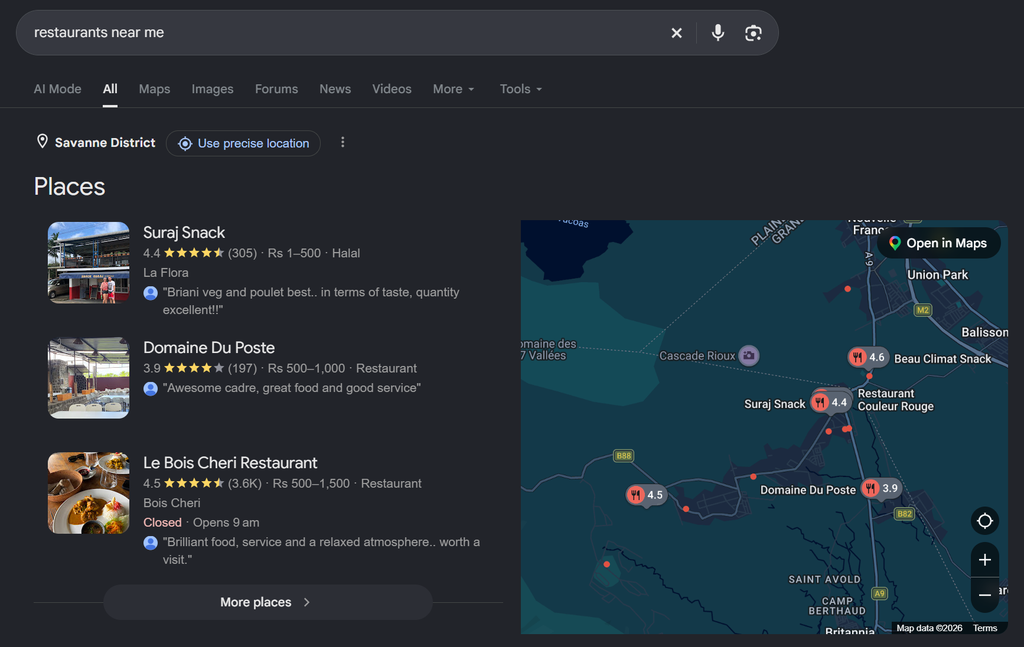
Here is an example below, when I search for “restaurants near me”, three places appear. In reality, there are many more restaurants but those with a better Google business profile get shown to me first. Now imagine, how many people can discover your business just like that.
Some businesses never claim their businesses so their profile can be manipulated by the public and they have no control over posts and reviews. That’s why it is important to claim and verify your business.
Why a shop needs a Google My Business profile more than a website
When someone in Rose-Hill searches “furniture store near me” or “boutique Quatre Bornes”, Google shows a map with three or four shops first. Most people choose from that map. They never scroll down to the websites.
Google says local results are based mainly on three things in its own guide to local ranking:
| Factor | What it means | What you control |
|---|---|---|
| Relevance | How well your profile matches what the person searched | Your category, products, description and attributes |
| Distance | How far your shop is from the person searching | Nothing, except an accurate pin on the map |
| Prominence | How well known your shop is | Reviews, your rating, photos and mentions of your shop online |
Google also says businesses with complete and accurate information are more likely to show up in local results. You cannot move your shop closer to customers. You can make your profile complete, accurate and trusted, and that is what the rest of this guide does.
This is the visibility stage of a marketing strategy. If you want to see how it fits with the other four stages, the visibility section of the marketing strategy guide for small businesses in Mauritius explains it.
Check yours: Search for the main thing you sell plus your town on your phone. Is your shop in the first three results on the map? Do it on an incognito window to be on the safe side.
How to add your business to Google Maps, step by step
First, search for your shop name on Google Maps. If a listing already exists, someone (a customer, an old manager, or Google itself) may have created it. In that case, choose “Claim this business” instead of creating a new one. Two listings for the same shop split your reviews and confuse customers.
If there is no listing, here is how to add your business to Google Maps:
- Go to business.google.com/add and sign in with a Google account the business owns, not a staff member’s personal account.
- Type your shop name exactly as it appears on your sign.
- Choose your main category (see the category section below).
- Say yes when Google asks if customers can visit your location, and enter your full address.
- Drag the pin so it sits exactly on your shop entrance. In a mall or a busy street in Port Louis, this matters.
- Add your phone number (ideally the one that is on WhatsApp) and your website or Facebook page if you have one.
- Complete the verification Google offers you.
Adding a profile is free. Google chooses the verification method for you, and its verification guide lists phone, SMS, email, video and post. You cannot pick one. Reviews can take up to five business days.
If Google asks for a video
Video verification is common for shops. Google asks you to show three things in one continuous recording:
- Where you are: your shop sign from outside, the street, and something nearby that confirms the location.
- That the business is real: your products on the shelves, branded bags or packaging, your price tags.
- That you manage it: the till, the stock room, or you unlocking the door.
Film it in daylight, in one take, without cutting. Plan your route before you press record.
Check yours: Can you open your profile from your own Google account, and does it say “Verified”?
Set it up as a storefront, with your real shop name
A shop is a storefront business: customers come to you, so your address is shown. If you also deliver, add a service area as well. That makes you a hybrid business. Do not hide your address, because people need it to find you.
Google’s rules for representing your business are strict about the name. It must match your real-world name, the one on your sign, receipts and Facebook page. Adding keywords, slogans or your town to the name breaks the rules and can get the profile suspended.
| Not allowed | Allowed |
|---|---|
| Maison Lila – Best Dresses Quatre Bornes | Maison Lila |
| MAISON LILA BOUTIQUE (all capitals) | Maison Lila Boutique (if that is your sign) |
| Maison Lila | Open 7 days | 5xxx xxxx | Maison Lila |
| A P.O. box or your home address for a shop | The address of the shop customers visit |
Maison Lila is a fictional boutique in Quatre Bornes, used as an example throughout this guide.
Google also expects the shop to have permanent signage and to be staffed during the hours you show. A stall that moves between markets does not qualify as a storefront.
Choose the most specific category
Your primary category is the single most important choice on your profile. It tells Google what you are, and it decides which searches you can appear in. Google asks you to choose the fewest categories that describe your core business, and the most specific one available.
A simple test from Google’s guidelines: your category should finish the sentence “This business is a…”. “Maison Lila is a women’s clothing store” works. “Maison Lila is a dresses” does not.
| Type of shop | Too broad | Better primary category |
|---|---|---|
| Ladies’ boutique | Store, Clothing store | Women’s clothing store |
| Sofa and bed showroom | Home goods store | Furniture store |
| Shoe shop | Clothing store | Shoe store |
| Phone and accessories shop | Store | Cell phone store |
| Bakery with a counter | Food | Bakery |
| Quincaillerie | Store | Hardware store |
Start typing in the category box and pick from Google’s list. You can add secondary categories later, for example “Furniture store” first and “Mattress store” second. Add them only if they describe what you really sell.
Check yours: Does your primary category describe your shop more precisely than your biggest competitor’s?
Opening hours and holiday hours
Wrong hours cost you more than a lost sale. A customer who drives from Curepipe to a closed shop rarely comes back, and may leave a one-star review on the way home.
Your profile has three types of hours, according to Google’s help page on business hours:
| Type | Use it for | Mauritian examples |
|---|---|---|
| Regular hours | Your normal weekly opening times | Monday to Saturday 9:00 to 18:00, Sunday half day |
| Special hours | Holidays and short closures (up to six days in a row) | Public holidays, Divali, Eid, Chinese Spring Festival, late opening in December, stock-taking day |
| More hours | Parts of the business with different times | Delivery hours, pickup hours, a café corner inside the shop |
Add special hours before each public holiday, not on the day. Google may also ask you to confirm your hours around holidays, so open your profile when you get that reminder.
If you close for longer, for example for renovation, mark the shop as “Temporarily closed” instead of deleting hours. Never mark it as permanently closed unless you really are closing.
Check yours: Look at your profile right now. Do the hours shown match the hours on your shop door today?
Photos that make people want to visit
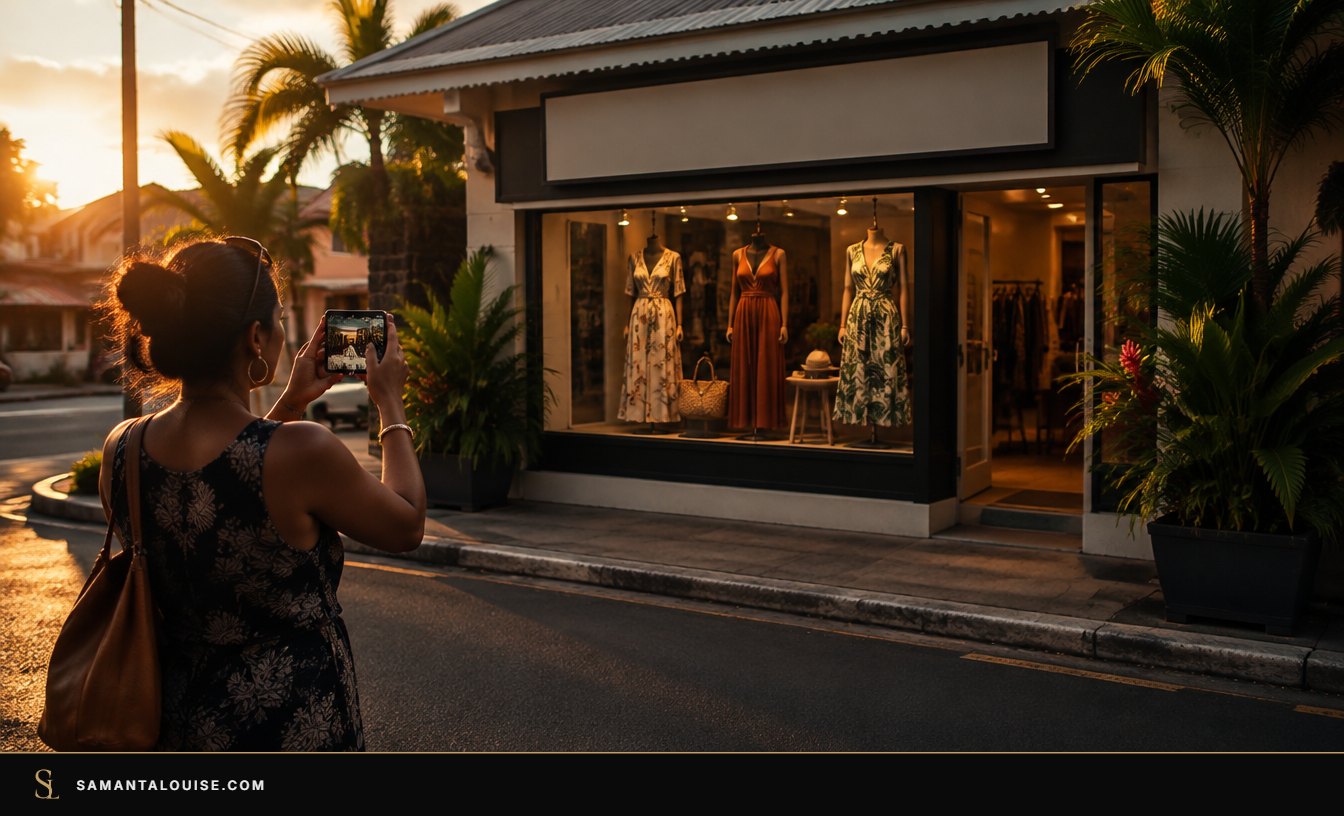
For a shop, photos do two jobs. They help people recognise your shop from the street, and they show what is inside before anyone makes the trip. Google’s photo tips recommend at least three photos of each of these:
| Photo type | What to shoot | Why it matters |
|---|---|---|
| Exterior | Your shopfront from across the street, from the parking, and at different times of day | Customers recognise you when they arrive |
| Interior | The shop as a customer sees it walking in, the fitting room, the counter | Shows the experience and the price level |
| Products | Your best sellers, new arrivals, the shelves full | Answers “do they have what I need?” |
| Team | You and your staff, smiling, in the shop | People buy from people, especially in Mauritius |
Technical basics from Google: JPG or PNG, between 10 KB and 5 MB, at least 250 x 250 pixels, and 720 x 720 pixels is recommended. Photos must be in focus, well lit and not heavily edited. Your phone is enough.
Add a few new photos every month: new stock, a window display, the shop decorated for Christmas. A profile with photos from 2021 looks like a shop that might have closed.
Check yours: If a stranger saw only your photos, could they find your shop entrance and guess your prices?
Products: show what is on your shelves
A shop profile can show a Products section with a photo, name, price and short description for each item. It appears on your profile in Google Search, and it answers the question most shoppers have before they leave home: “Do they have it, and how much is it?”
According to Google’s product editor page, local shops selling physical goods can add products by hand. Google now manages these products through a free Merchant Center account, so it may ask you to connect one when you first add products. Products must follow Google’s shopping policies, and breaking them can get all your products removed.
Google also has a Local Inventory app that syncs products from your till automatically. At the time of writing it is only available in the US, Canada, the UK, Ireland and Australia (source), so shops in Mauritius add products by hand.
You do not need your whole catalogue. Start with 10 to 15 items:
- your five best sellers,
- three or four products people often call to ask about,
- and two or three new arrivals you want to push this month.
Here is a simple template for each product:
Name: Linen wrap dress, sand colour
Price: Rs 2,450
Description: Light linen, sizes S to XL, ideal for summer weddings. Ask us on WhatsApp to reserve your size.
Photo: the dress on a hanger or a model, on a plain background
Example for a fictional boutique; price is illustrative
Prices are optional, but showing them filters out people who would never buy and reassures those who would. If prices change often, use “from Rs…” in the description.
Attributes: pickup, delivery, payments and access
Attributes are the small details shown on your profile, such as “In-store pickup”, “Delivery”, “Wheelchair-accessible entrance” or the payment methods you accept. Google says they appear on Search and Maps and help customers know what to expect.
Which attributes you can choose depends on your category and your country, so you may not see every option. Go through the list once and tick everything that is true. For a shop in Mauritius, the ones worth checking are:
- delivery and in-store pickup, if you offer them,
- payment methods, especially card and mobile payments such as Juice or MyT Money if you accept them,
- wheelchair access and parking, which matter for older customers and families,
- and any ownership attributes Google offers in your category.
Attribute changes can take from a few minutes to several weeks to show, so check back after a week.
Reviews: the part that turns a visit into a choice
Your profile gets you onto the map. Your reviews decide whether someone picks you or the shop next door. BrightLocal’s 2026 Local Consumer Review Survey found that 68% of consumers will only use a business with four stars or more, and 74% look for reviews written in the last three months.
So a shop with 40 reviews from 2022 can lose to a shop with 12 reviews from last month. Recency matters as much as the total.
The short version for a shop:
- Ask at the till, when the customer is happy with what they bought.
- Keep a small QR code card at the counter that opens your review link.
- Send the link on WhatsApp after a delivery or a big purchase.
- Reply to every review within a day, in the language the customer used.
- Never offer a discount or a gift in return for a review. It breaks Google’s rules.
The full method, with ready-to-send messages in English, French and Creole, is in this guide on how to get more Google reviews in Mauritius.
Check yours: How many reviews did your shop get in the last 30 days?
Example: a boutique profile, before and after
Maison Lila is a fictional boutique in Quatre Bornes. The details below are illustrative.
| Part of the profile | Before | After |
|---|---|---|
| Name | “Maison Lila Best Dresses QB” | Maison Lila |
| Category | Store | Women’s clothing store |
| Hours | Last updated in 2023, no holiday hours | Correct hours, special hours for December and public holidays |
| Photos | 4 photos, all from the opening day | Shopfront from the street, inside, fitting room, 12 product photos, the team |
| Products | None | 12 best sellers with prices and a “reserve on WhatsApp” line |
| Attributes | None ticked | In-store pickup, delivery, card payment |
| Reviews | 9 reviews, last one 14 months ago, no replies | A QR card at the till, a WhatsApp follow-up, every review answered |
Nothing in the “after” column costs money. It costs one afternoon, then about 10 minutes a week.
Why Google My Business alone will not grow your sales
Here is the trap. Many shop owners set up a perfect profile, see more views and direction requests, and then wonder why the till looks the same.
The profile is a tool. The tool is not the strategy. It brings people to your door. What happens next depends on things the profile cannot fix: whether the products on show are the ones your best customers want, whether your offer is clearer than the shop next door, and whether anyone follows up when someone sends a WhatsApp message asking “is this in stock?” and gets no reply until the next day.
In my work with Ashley Furniture, we treat online visibility, showroom visits and follow-up as one system, instead of treating Google, the showroom and the sales team as separate jobs. The profile brings people in. The showroom and the follow-up turn them into buyers.
That is why the order matters. Find your weakest stage first. If people find you but do not visit, the problem is trust. If they visit but do not buy, it is conversion. The five stages of a small-business marketing strategy show where your profile fits and what to fix around it.
Check yours: When someone finds your shop on Google Maps, can you say what makes them choose you, and what happens if they message before visiting?
Your 10-minute weekly routine
- Reply to every new review.
- Answer any messages or calls that came through the profile.
- Add two or three new photos (new stock, a display, the team).
- Update a product or its price if it changed.
- Before a public holiday, add special hours.
- Once a month, open the Performance section and note calls, direction requests and website clicks in a simple sheet.
Common mistakes that keep shops invisible
- Keywords in the shop name. It breaks Google’s rules and can get the profile suspended.
- A broad category such as “Store” instead of the specific type of shop.
- Old hours, especially around public holidays and in December.
- A profile owned by a former employee or an agency you no longer work with. Make sure the owner’s account has access.
- Duplicate listings for the same shop, which split your reviews.
- Only old photos, which make customers wonder if you are still open.
- Ignoring reviews, good or bad. A reply shows the shop is alive and cares.
Frequently asked questions
Is Google My Business free?
Yes. Creating, verifying and managing a Google Business Profile (formerly Google My Business) is free. You only pay if you choose to run Google Ads.
How long does it take to appear on Google Maps?
Your shop appears after it is verified. Google says verification reviews can take up to five business days, and sometimes longer. Edits to an existing profile can also take some time to show.
Can I have a Google My Business profile without a shop address?
Yes, as a service-area business, but then your address is hidden and you appear for the areas you serve. A shop that customers visit should show its address as a storefront.
My shop already appears on Google Maps but I did not create it. What do I do?
Search for your shop on Google Maps, open the listing and choose “Claim this business”. Then follow the verification steps. Do not create a second listing.
Can I add products in rupees?
Yes. Add the price in rupees in the product details or write “from Rs” in the description if prices vary.
Should I put “Mauritius” or my town in my shop name to rank better?
No. Your name must match your real shop name. Adding locations or keywords breaks Google’s rules and can lead to suspension. Google already knows where you are from your address.
Start with the stage that is holding you back
A complete Google My Business profile is one of the cheapest ways for a shop in Mauritius to get more visits. Set it up this week, then keep it fresh with the 10-minute routine.
If you are not sure whether visibility is really your weakest stage, take the free Market Dominator Scorecard. It takes a few minutes and shows which of the five stages to fix first. If you want the full plan for your business, the Market Dominator Blueprint builds it with you.
When did you last update the photos and hours on your shop’s Google profile?
Sources
- Google Business Profile Help: Add your business to Google Maps
- Google Business Profile Help: Verify your business on Google
- Google Business Profile Help: Guidelines for representing your business on Google
- Google Business Profile Help: Tips to improve your local ranking on Google
- Google Business Profile Help: Edit your business hours
- Google Business Profile Help: Tips for business-specific photos
- Google Business Profile Help: About product editor
- Google Business Profile Help: Manage products in Merchant Center
- Google Business Profile Help: Showcase in-store products on Google Search and Maps
- Google Business Profile Help: Manage your business attributes
- BrightLocal: Local Consumer Review Survey 2026