WhatsApp Broadcast for Business: Send Promotions Without Getting Blocked
A WhatsApp broadcast sends one message to many customers at once, but each person receives it privately, like a normal one-to-one chat, and their replies come only to you. It is one of the easiest ways for a small business in Mauritius to announce a promotion, new stock or an event. To avoid getting blocked: only message people who agreed and saved your number, send different messages to different groups of customers, keep it to two to four messages a month, make every message useful, and make it easy to say “stop”.
THE QUICK ANSWER
- What it is: one message, sent privately to many customers at once.
- Who receives it: only people who have saved your number in their phone.
- Permission first: ask before you add anyone to a list.
- Right message, right group: use labels to split your lists.
- Two to four messages a month, each with a clear reason to reply, and a way to stop.
A warning first. A broadcast is the fastest way to reach your customers, and also the fastest way to annoy them. Businesses that blast the same promotion to everyone, every week, get blocked, and a blocked number cannot reach that customer again. The rest of this guide shows how to set up WhatsApp Business, create your first broadcast list and write messages people are glad to receive.
In this guide
What is a WhatsApp broadcast?
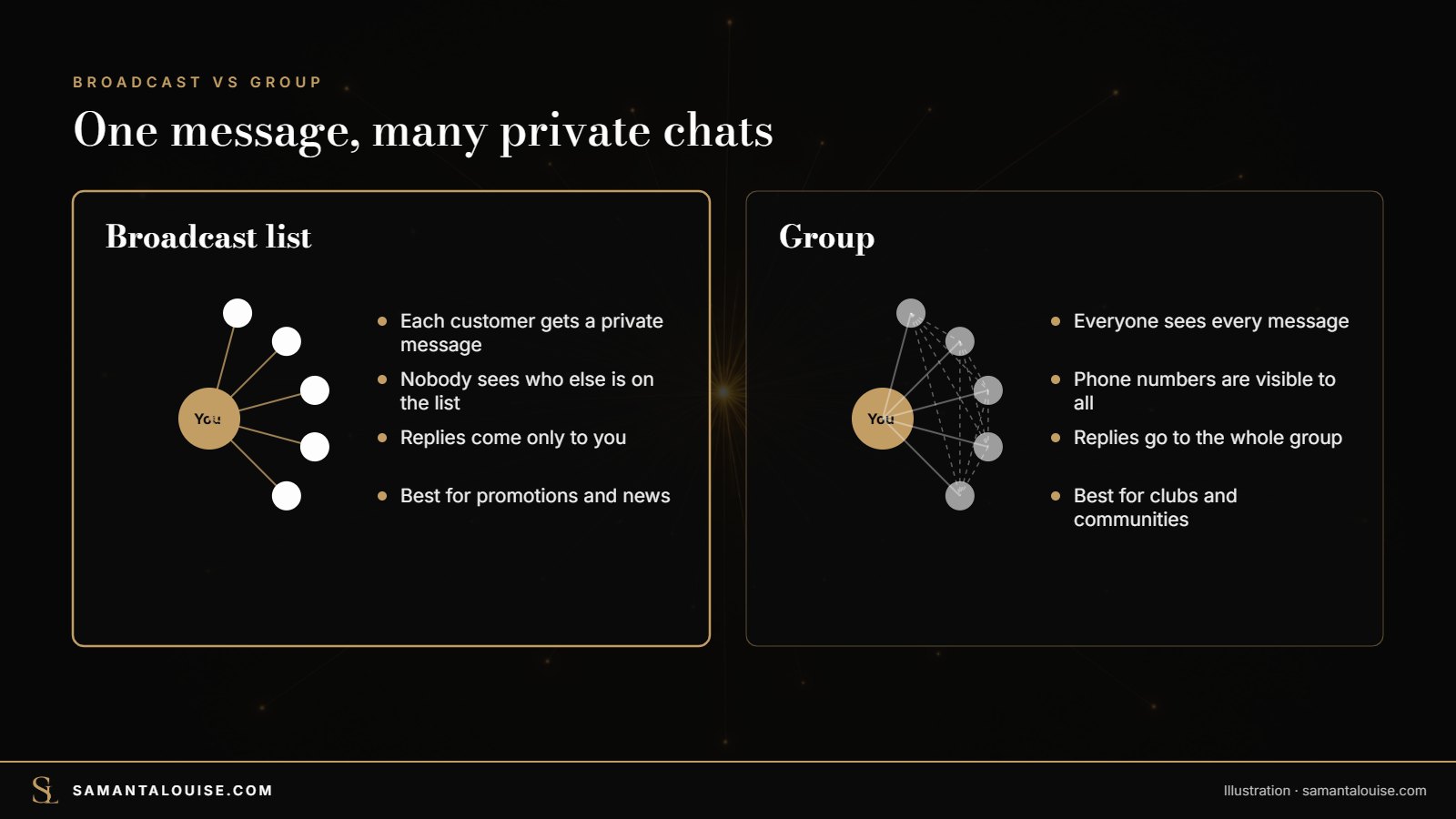
A broadcast list is a list of customers you save in WhatsApp. When you send a message to the list, every person receives it as a private message from you. Nobody sees who else is on the list, and when someone replies, only you see the reply. To them, it feels like a personal message, not a group.
| Broadcast list | Group | Status | Channel | |
|---|---|---|---|---|
| Who sees it | Each person privately | Every member | Your contacts who open it | Anyone who follows |
| Replies | Private, to you only | Everyone sees them | Private reply | Reactions only |
| Members see each other? | No | Yes, numbers are visible | No | No |
| Best for | Promotions and news to customers | Communities, clubs, events | Daily updates, behind the scenes | Large audiences, one-way news |
For promotions, a broadcast list is usually the right choice: it keeps customers’ numbers private and turns every reply into a one-to-one conversation you can turn into a sale.
How WhatsApp broadcasts help a small business
Most Mauritians already use WhatsApp every day, so a broadcast lands where your customers already are. Used well, it helps you to:
- Announce promotions: a weekend sale, a festival offer for Divali, Christmas or Eid, a last-minute deal.
- Share new arrivals: new stock, a new menu, a new service, with a photo.
- Fill quiet days: “Tuesday only: 2 for 1 on lunches”.
- Invite people to events: a launch, a tasting, a workshop.
- Remind and re-activate: a seasonal service reminder, or a “we miss you” message to customers who have not bought in a while.
Because each reply arrives as a private chat, you can answer questions, take orders and close sales straight away. That is what makes a broadcast more powerful than a post that people scroll past.
Before you start: set up WhatsApp Business properly
Broadcasts work on WhatsApp and on the free WhatsApp Business app, but use the Business app for your shop. It gives you a business profile, labels to sort customers, quick replies and automatic messages. Here is the short version; the full step-by-step is in the WhatsApp Business setup guide.
- Install WhatsApp Business on a phone with your business number, ideally a number that is not your personal one.
- Complete your business profile: business name, category, description, address, opening hours, email and website.
- Add a catalogue of your main products or services with photos and prices.
- Create labels to sort customers, for example: New customer, Regular, VIP, Wedding, Corporate.
- Set up quick replies for the questions you answer every day, in English, French and Creole.
- Turn on a greeting and an away message so nobody waits without an answer.
Check yours: Open your WhatsApp Business profile as a customer would see it. Are your hours, address and catalogue all there?
How to create a WhatsApp broadcast list, step by step
| Android | iPhone | |
|---|---|---|
| 1 | Open WhatsApp Business and tap the three dots (top right) | Open WhatsApp Business and go to Chats |
| 2 | Tap New broadcast | Tap Broadcast lists, then New list |
| 3 | Choose the contacts | Choose the contacts |
| 4 | Tap the green tick | Tap Create |
| 5 | Rename the list (for example “VIP customers”) and write your message | Rename the list and write your message |
Three things to know, from this 2026 guide to broadcast lists:
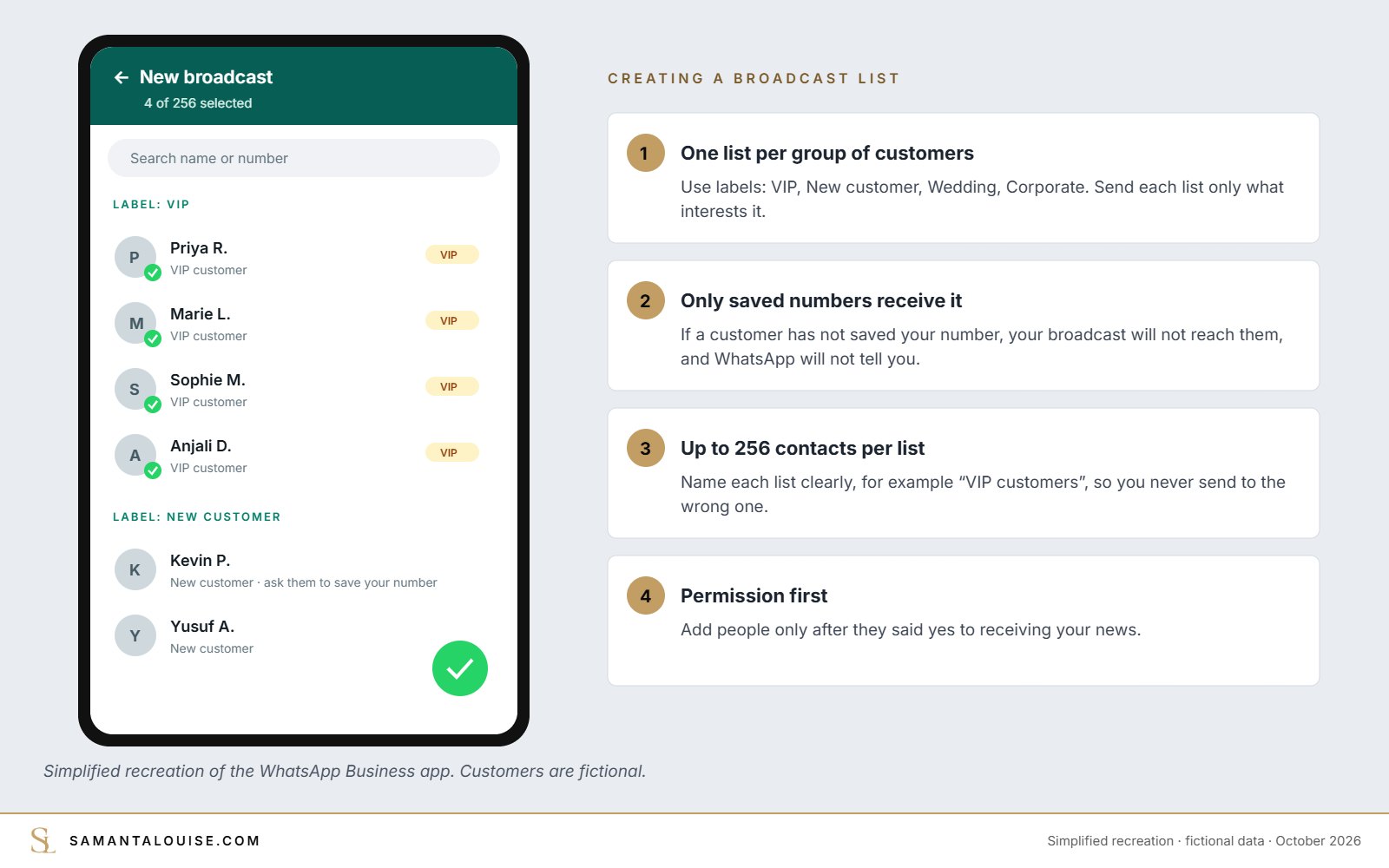
- Only people who have saved your number receive your broadcast. If they have not saved it, the message simply does not arrive, and WhatsApp does not tell you.
- Each list holds up to 256 contacts. For more customers, create several lists, which also helps you send the right message to the right people.
- You create lists on your phone, not on WhatsApp Web.
One more point to watch. In March 2025, TechCrunch reported that WhatsApp would start testing limits on broadcasts, with a free allowance and paid options for businesses. These rules are being rolled out country by country, so check what your app shows before planning a big campaign.
Check yours: How many of your customers have actually saved your business number? Ask your next ten customers.
Get permission first, and get your number saved
This is the rule that protects you from blocks. WhatsApp’s own Business Messaging Policy says you may only contact people who have given you their number and who have agreed to receive messages from you. In practice, ask at the moment people are happiest with you: right after they buy.
- At the till: “Would you like our offers on WhatsApp? Save our number and send us ‘Hi’.”
- A QR code on the counter, receipts and packaging that opens a chat with your business.
- A line on your website, Facebook page and Google Business Profile.
- After a good conversation on WhatsApp: ask if they would like to receive your news.
English: “Thank you for your order, Priya! Would you like to receive our new arrivals and members-only offers here on WhatsApp, about twice a month? Just reply YES, and save this number so the messages reach you.”
Français : “Merci pour votre commande, Priya ! Souhaitez-vous recevoir nos nouveautés et nos offres réservées ici sur WhatsApp, environ deux fois par mois ? Répondez simplement OUI, et enregistrez ce numéro pour bien recevoir nos messages.”
Fictional example. Adapt it to your business.
How to send WhatsApp broadcasts without getting blocked
| Do | Do not |
|---|---|
| Send two to four messages a month | Send something every day |
| Split lists with labels: send wedding offers to wedding clients only | Send every offer to everyone |
| Start with the customer’s first name when you can, and sound like a person | Copy-paste long, impersonal adverts |
| Give a reason to read: a real offer, news, a useful tip | Send “Hello, any orders?” |
| Send between 9 a.m. and 7 p.m. | Message late at night or very early |
| End with “Reply STOP if you prefer not to receive our news” | Ignore people who ask you to stop |
| Use one photo or a short video | Send heavy files, chains or forwarded messages |
When someone replies STOP, remove them from your lists the same day and thank them. A customer who leaves your list politely may still buy from you; a customer who blocks you is gone.
WhatsApp promotion messages you can copy
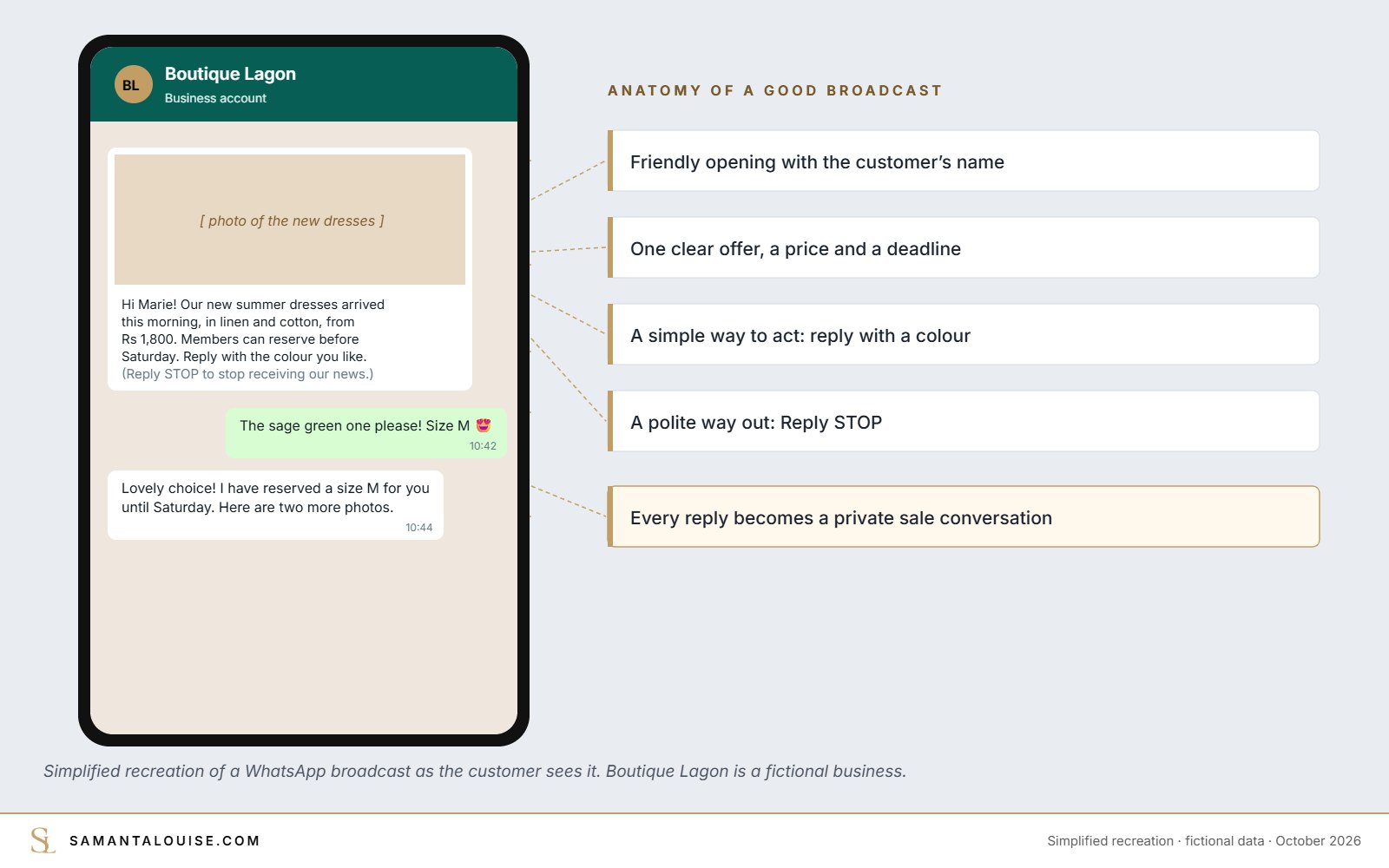
A good broadcast follows a simple shape: a friendly opening, the news or offer, a deadline, how to act, and a polite way out.
New arrivals: “Hi Marie! Our new summer dresses arrived this morning, in linen and cotton, from Rs 1,800. Members can reserve before Saturday. Reply with the colour you like and I will send photos. (Reply STOP to stop receiving our news.)”
Flash promotion: “Hello Kevin! This weekend only: 20% off all dining chairs, in store and on WhatsApp orders. Offer ends Sunday 6 p.m. Reply CHAIRS to see the models. (Reply STOP to stop.)”
Event invitation, French: “Bonjour Sophie ! Nous organisons une soirée découverte jeudi à 18h, avec dégustation et cadeaux pour nos clientes fidèles. Places limitées : répondez OUI pour réserver la vôtre. (Répondez STOP pour ne plus recevoir nos messages.)”
Fictional examples. Prices and names are illustrative.
How to know if your broadcasts are working
After each broadcast, note four numbers in a simple sheet or your CRM:
| Number | What it tells you |
|---|---|
| Replies | Whether the message interested people |
| Sales or bookings from replies | Whether the offer was right |
| STOP requests | Whether you send too often or to the wrong list |
| People who stopped receiving messages | A sign of blocks or unsaved numbers: clean the list |
In the message info of a broadcast, you can usually see who has received and read it. If a list rarely replies, change the message or the offer before you send more.
Why WhatsApp broadcasts alone will not grow your sales
A broadcast is a delivery tool. It cannot decide who should receive what, or why they should care. The classic mistake is to blast promotions to everyone until they block you.
Picture a fictional clothing boutique in Port Louis. It adds every number it has ever received to one list, then sends a discount every Monday. Within two months, half the list has blocked the number, the other half ignores it, and the boutique concludes that “WhatsApp does not work”.
A strategy starts with the customer: who are your best customers, what do they care about, and how often do they want to hear from you? Broadcasts belong to the growth stage, after the first sale, and they work best as part of a customer loyalty plan. The growth stage of a marketing strategy and the five stages show how they connect.
Check yours: If a customer read your last three broadcasts, would they feel you know them, or that you are selling to everyone?
Frequently asked questions
What is a WhatsApp broadcast?
A WhatsApp broadcast sends the same message to a list of contacts at once. Each person receives it privately, cannot see who else is on the list, and replies only to you.
What is the difference between a WhatsApp broadcast and a group?
In a group, every member sees all the messages, replies and phone numbers. In a broadcast, each person receives the message privately, and replies come only to you.
Why did some customers not receive my WhatsApp broadcast?
Broadcasts only reach people who have saved your number in their phone contacts. Ask customers to save your number and send you a message first.
How many people can I add to a WhatsApp broadcast list?
A broadcast list holds up to 256 contacts. You can create several lists, which also helps you send the right message to each group of customers.
How often should I send WhatsApp broadcasts?
Two to four times a month is a safe rhythm for most small businesses. Send more only if customers clearly reply and buy, and never daily.
Are WhatsApp broadcasts free?
Broadcast lists in the WhatsApp Business app have been free, but WhatsApp has been testing monthly allowances and paid options for business broadcasts in some countries. Check what your app shows.
Send your first broadcast this week
This week: set up your labels, ask your next ten customers to save your number, create one list for your best customers, and send them one useful message. Then note who replies.
Not sure whether your customers need more messages or a better offer? The free Market Dominator Scorecard shows your weakest stage in a few minutes. If you want the whole plan built with you, the Market Dominator Blueprint does it in 10 days.
Which group of your customers would be happiest to hear from you this month?